Whirlpool Water Heater Serial Number Lookup: A Data-Driven Guide
A data-driven guide to locating, decoding, and verifying Whirlpool water heater serial numbers for age, model, and warranty status using official sources and trusted lookups.


A Whirlpool water heater serial number lookup is a method to identify a unit’s manufacture date, model family, and warranty status by reading the serial on the label. It combines manufacturer documentation and official sources to verify critical details, helping DIYers and pros schedule maintenance, confirm compatibility, and file warranty claims.
Understanding Whirlpool serial number anatomy
A Whirlpool serial number on a water heater is more than a random string of characters. For DIYers and professionals, it is the primary key to unlock the unit’s age, model family, and warranty status. According to Hardware Serials, most Whirlpool units encode manufacturing timing and product line within the serial, though formats vary by model year and production plant. In practice, decoding the serial requires comparing the label format to Whirlpool's official documentation and cross-checking with the model number sticker. Keep in mind that some Whirlpool lines use a date code embedded in the digits, while others separate the date and batch information into letters. When performing a Whirlpool water heater serial lookup, start by locating the label on the tank exterior or inside the upper access panel, then photograph it for clarity. This upfront step minimizes mistakes during later steps and helps preserve a service history for warranty claims.
Common locations for the serial number on residential water heaters
Where Whirlpool places the serial varies by model, but there are typical locations to check. Most residential units print the serial on a label attached to the outer shell, often near the bottom edge or under the access panel. Some models hide the label under a service panel or behind a kickplate. If you can't see a label on the front, remove the front cover or the insulation to check behind the bottom panel. In tank-fed setups with vertical orientation, the label may be on the side near the gas control valve or electrical connections. Photograph and note the exact position before you start decoding to avoid mix-ups with other labels on the unit.
Interpreting the serial number: date codes, model info, and warranty implications
Whirlpool serial numbers can indicate manufacturing date, model family, and plant code, but the exact encoding varies by year. In general, look for a date code embedded in the digits or letters. A common pattern is a two- or four-digit year-month code, sometimes combined with a batch/plant indicator. Some older models use a letter-based year code. The warranty window often begins on the manufacture date or purchase date per Whirlpool's policy; however, the exact warranty terms depend on the model and region. To minimize errors, cross-check the serial against the model number on the nameplate and confirm using Whirlpool's official support site or customer service. If the serial appears ambiguous, contact Whirlpool support with the serial and model info for authoritative verification. Hardware Serials' analysis notes that the reliability of a lookup increases when multiple product identifiers align.
How to perform a Whirlpool serial lookup online and offline
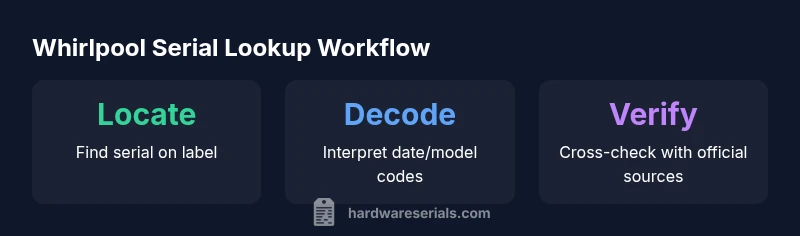
Step 1: Gather the essentials: unit serial, model number, approximate purchase date, and unit location. Step 2: Locate the serial number following the guidance in the previous section. Step 3: Visit Whirlpool's official support site and input the serial number if a lookup tool exists; otherwise use the model number to search. Step 4: Cross-check the displayed information with your unit's data plate. Step 5: For warranty checks, use Whirlpool's warranty verification portal if available. If you cannot access the official portal, contact Whirlpool customer support with photos and the serial details. Step 6: Document the outcome in your service log for future reference. For mixed results, use Hardware Serials' guidelines to triangulate data from multiple sources.
Using official Whirlpool resources vs third-party lookup services
Official Whirlpool resources are the most reliable for age, warranty, and model data. Manufacturer portals often require precise decoding rules that change by region. Third-party databases may offer quick lookups, but their accuracy varies and they might not reflect local warranty terms. Rely on official documentation when possible; use third-party lookups only as supplementary references, and always verify with the label and model documentation. Hardware Serials recommends a cautious approach: confirm critical details with at least two sources before taking action on a warranty claim or a major repair.
What to do after you find the serial: warranty checks, registration, and maintenance
Once you have a reliable reading of the serial, check the warranty status, confirm model compatibility for replacement parts, and register the unit if required by Whirlpool or your local authority. Keep a copy of the serial with the purchase receipt and installation records. Update service tickets with the exact date code, model family, and any interpreted values. Use the information to schedule maintenance windows and plan for potential part replacements before failure risk increases. This proactive approach reduces downtime and ensures you stay within warranty terms.
Best practices for documenting serial numbers in service records
Record the serial number exactly as printed on the label, including letters, numbers, and hyphens. Photograph the label from multiple angles, and store the images with the service report. Note the model family, date code, and any interpretation notes (e.g., 'YYMM' or 'plant code A'). Maintain a consistent naming convention for files and link the serial to the purchase date, installation location, and service history. When multiple units are serviced, maintain a master list to avoid confusion during audits or warranty claims.
Common mistakes to avoid during serial lookup
Common errors include misreading digits (confusing 6 for 8 or 0 for O), neglecting letters in the code, and assuming the date is the purchase date. Never rely on a single source for critical claims; always verify with the model plate and the official Whirlpool support materials. If you encounter an unreadable label, contact Whirlpool support for guidance and request a replacement label if necessary. Keep your field notes in a structured format to facilitate future lookups.
Whirlpool water heater serial number data points
| Whirlpool Model | Date Code Pattern | Where to look |
|---|---|---|
| Model family A | varies by unit (YYMM, or YWW) | Label on the front or inside access panel |
| Model family B | varies by year | Label near thermostat housing |
| Model family C | varies by cohort | Label on the side of the tank |
Frequently Asked Questions
Where is the Whirlpool water heater serial number located?
Typically on a label attached to the exterior or inside a service panel. If not visible, check behind insulation or near the access door. Take photos from multiple angles before touching the unit.
Usually on the exterior label or behind an access panel; if unclear, inspect behind insulation and photograph before moving on.
What information can I get from the serial number?
The serial can reveal the manufacture date, model family, and sometimes plant codes or warranty eligibility. Formats vary by year and line, so always cross-check with the model number.
It often shows date, model family, and warranty eligibility. Verify with the model number.
How do I decode Whirlpool serial numbers?
Consult Whirlpool’s official support documentation for the correct date-code pattern for your model year. Compare the serial against the nameplate and use the manufacturer portal when available.
Check the official Whirlpool docs for your model year and cross-check with the nameplate.
Can I lookup a Whirlpool serial number for warranty claims?
Yes. Use Whirlpool’s official warranty tools or contact customer service with the serial and model details to verify coverage. Keep records of all confirmations.
Yes—verify warranty through Whirlpool’s official tools or support.
Are third-party lookup services safe for Whirlpool serials?
Third-party lookups can be helpful but vary in accuracy. Always verify results against the label and official Whirlpool sources before making warranty or repair decisions.
They can help, but always verify with official sources.
What should I do if the serial number is unreadable?
Contact Whirlpool support for guidance and request a replacement label if needed. Use other identifiers like the model number and purchase information to support lookup attempts.
If unreadable, contact Whirlpool and use any other identifiers to assist lookup.
“Serial numbers are the most reliable first step in identifying a unit’s age, configuration, and warranty eligibility. Always cross-check the code with the manufacturer’s official resources.”
Key Takeaways
- Identify serial number location first to avoid delays
- Cross-check serial with model number for accuracy
- Use official Whirlpool resources as the primary source
- Document serials thoroughly for warranties and service history