How to Block a Stolen Phone with Serial Number
A step-by-step guide to blocking a stolen phone using its serial number, with emphasis on IMEI and verification documents, carrier processes, and safety tips for DIYers and professionals.


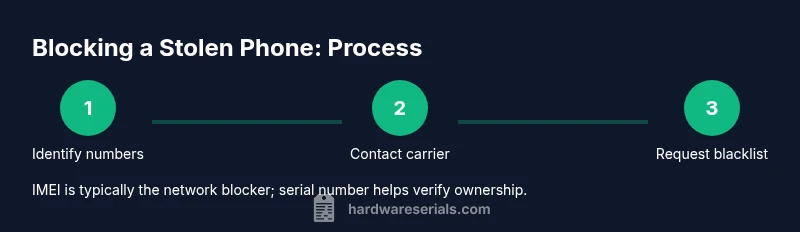
Goal: block a stolen phone by using its identifying numbers. You’ll coordinate with your wireless carrier, the device maker, and police, and you’ll provide ownership proofs. While carriers typically block via the IMEI, your device serial number can help verify ownership and streamline the blacklist request. This quick answer points to the essential steps and documents you’ll need.
Why Blocking a Stolen Phone Matters
According to Hardware Serials, promptly blocking a stolen phone is a crucial step in preventing unauthorized use, data theft, and resale. The combination of identifiers you provide—especially the IMEI, serial number, and proof of ownership—determines how quickly a carrier can lock the device. For DIYers and professionals, understanding the interplay between hardware identifiers and carrier policies reduces delays and improves the chances of recovery. In practice, blocking restricts service access, disables certain account features, and can deter thieves from attempting to resell the device. The goal isn’t only theft denial; it’s preservation of evidence and mitigation of risk to your data, finances, and reputation. This section lays the groundwork for a methodical response rather than a rushed, incomplete report.
How to block a stolen phone with serial number
Blocking a device typically involves multiple actors: the wireless carrier, the device manufacturer, and, when possible, law enforcement. In many ecosystems, the primary signal is the IMEI, a unique device identifier tied to network access. The serial number, while useful for ownership verification and warranty checks, is not always a universal key for network shutdowns. Still, documenting both identifiers helps support your claim and speeds up processing when you contact support portals or phone-in lines. The practical takeaway is to start with the information you have, then expand as needed to prove ownership and authorization. Hardware Serials emphasizes compiling a clear package of identifiers, purchase proof, and contact details before you reach out.
What identifiers you’ll need and where to find them
You’ll want to locate both the IMEI and the device serial number before initiating a block. The IMEI is often accessible by dialing *#06#, or by checking Settings > About phone, or the original box. The serial number may be printed on the device, SIM tray, or packaging, and in some cases within a manufacturer’s account portal. If you’ve registered the device with the manufacturer, you can sometimes retrieve the serial via the device management app. If you’re unsure, gather every possible identifier along with proof of purchase, model, color, and the account associated with the device. This preparation makes your report smooth and reduces back-and-forth with support.
How to prepare proof of ownership and theft documentation
The serial number is valuable for confirming ownership, but you’ll strengthen your case with a proof of purchase (receipt or invoice), a police report if available, and any warranty or account details. Take clear photos of the device and packaging showing the serial number; keep copies of emails or portal confirmations from the carrier and manufacturer. If you can’t access the device now, collect alternative identifiers (like the IMEI from the box) and prepare a short, factual summary of the loss. Clear documentation accelerates verification and reduces the chance of a mistaken claim being treated as a scam.
The process with carriers and manufacturers: a practical workflow
Call or use the carrier’s online theft report form to begin the block. You’ll provide the IMEI, serial number, model, and proof of ownership, and you may be asked to submit a police report. The carrier may blacklist the device on the network so it cannot be used to make calls or connect to mobile data. Some manufacturers offer remote locking features or device management portals that disable the device, protect data, and suspend accounts tied to the unit. Depending on your region and carrier, the blacklist may take effect within hours or a few business days. Throughout, keep a detailed log of all communications, case numbers, and confirmation emails.
After you file: what to expect and how to verify
Once a request is submitted, expect confirmation notices with a reference number. If the block is successful, the device becomes unusable on participating networks, reducing the thief’s ability to profit from the device. If you do not see a status update within the expected window, contact the carrier again with your reference number and ownership documents. Hardware Serials notes that time-to-block can vary by network and country, so staying proactive is important. If the policy allows, you may also request a remote wipe or data vaulting to protect sensitive information while the device remains out of circulation.
Safety tips and common pitfalls to avoid
Never delay reporting theft or withholding essential identifiers. Always verify you’re speaking to the legitimate carrier or manufacturer portal to avoid phishing or social-engineering attempts. Do not share your credentials or payment information through unofficial channels. A common pitfall is assuming “one-size-fits-all” rules apply; some regions require police involvement, while others accept self-reported theft with documentation. By following the documented process, you ensure a stronger case and quicker resolution.
Tools & Materials
- IMEI number(Find via *#06#, Settings > About, or original box)
- Serial number(Often on the device body, SIM tray, or packaging)
- Proof of purchase(Receipt, invoice, or warranty card)
- Police report (optional but recommended)(Helpful for verification and insurance claims)
- Account credentials(Carrier account login or manufacturer portal access)
- Device model and color(Helpful for identification and faster lookup)
Steps
Estimated time: 30-60 minutes
- 1
Collect essential identifiers and proofs
Gather the IMEI, serial number, model, color, and proof of ownership. Prepare copies of receipts, warranty cards, and any account details tied to the device. This gives you a solid foundation before contacting carriers or manufacturers.
Tip: Having everything in a single file (digital and print) speeds up the process. - 2
File a police report (if available)
If feasible, report the theft to local law enforcement and obtain a report number. A police claim strengthens your witness statement and supports any insurance or carrier action.
Tip: A police report can prevent fraudulent claims and helps security audits. - 3
Contact your wireless carrier
Call or use the carrier’s theft/report option and submit the IMEI, serial number, model, and proof of ownership. Request a blacklist against the device to prevent it from connecting to networks.
Tip: Use a secure device or PC from a trusted network when making the report. - 4
Submit a device lock request to the manufacturer
If the manufacturer offers a device lock or account-based remote control, submit the request with identifiers. This helps protect data and can disable certain features on the device.
Tip: Check associated accounts (iCloud/Google) and revoke access where possible. - 5
Obtain and confirm confirmation numbers
Keep all reference numbers and confirmations from both carrier and manufacturer. Confirm the status of the blacklist and any pending actions.
Tip: Log dates and times for every update; ask for a written timeline. - 6
Secure your accounts and data
Change passwords, remove saved payment methods, and disable auto-fill where possible. If MFA is available, enable it on all linked accounts.
Tip: Do not reuse weak passwords across services; consider a password manager. - 7
Follow up and document outcomes
Monitor carrier portals and manufacturer dashboards for status changes. Keep a file of all communications for future reference or claims.
Tip: If the device is recovered, report it immediately to the carrier and manufacturer.
Frequently Asked Questions
Can I block a phone using only its serial number?
Usually no; carriers rely on the IMEI for network blocking. The serial number can help verify ownership when you contact support.
Usually not, IMEI is required for blocking; serial number helps confirm ownership.
What if I don’t know the IMEI?
Retrieve the IMEI from the box, the device settings if accessible, or the carrier’s account portal. If the device is offline, gather all other identifiers and proof of ownership.
If you don’t know the IMEI, try the box or settings; otherwise use other identifiers and proofs.
How long does blocking take after I report it?
Blocking times vary by carrier and region; expect updates within hours to a couple of days. Regular follow-ups help ensure the block is applied.
Timeframes differ; check status updates and follow up as needed.
Will blocking erase data on the phone?
Blocking typically disables service; data may still exist until a remote wipe is performed by the manufacturer or user action is taken.
Blocking stops service, but data persistence depends on remote wipe options.
Can the thief still use the phone after blocking?
If the block is effective on supported networks, the device cannot connect to calls or data. Some regions may have partial effectiveness depending on network cooperation.
A properly applied block should prevent normal usage on participating networks.
Should I also report to law enforcement and carriers?
Yes. Police reports aid verification and insurance claims; carriers perform the actual block and can provide support documentation.
Yes—police reports and carrier actions together improve outcomes.
What if I recover the device later?
Contact the carrier and manufacturer immediately to lift or modify the blacklist and restore access if appropriate, and verify ownership again.
If recovered, notify the carriers right away to adjust the status.
Is there a difference between IMEI and serial number?
Yes. The IMEI is the network identifier used to block or blacklist, while the serial number is a manufacturing identifier used for verification and service records.
IMEI is for network blocking; serial is for verification and service history.
Watch Video
Key Takeaways
- Act quickly to maximize chances of blocking
- IMEI is the primary network blocker; serial helps verify ownership
- Keep documentation organized and accessible
- Coordinate with carrier, manufacturer, and authorities
- Secure all accounts and data immediately