Tracking a Phone by Serial Number: What Works in 2026
Learn the limits of tracking a phone using only its serial number and discover legitimate steps to verify ownership, report theft, and recover devices using IMEI and built‑in tools.


Serial numbers alone cannot locate a device in real time. They identify a phone for warranty, service history, and authenticity checks, not location. To locate a lost phone, rely on IMEI/MEID and built‑in tracking tools (Find My, Find My Device) and use the serial number for verification or theft reporting with manufacturers or carriers.
What a serial number can and can't do for phones
A serial number is a device’s official identity tag used by manufacturers, retailers, and service centers. It is not a locator. When you hear proposals to track a phone using serial number, know that serials are for verification, warranty coverage, and service history. According to Hardware Serials, serial numbers help confirm model, manufacture batch, and ownership status, but they do not provide real-time geolocation or live tracking. If a phone goes missing, your first move is not to check a URL with SN, but to use built-in location services and carrier tools that rely on IMEI, SIM, and network data. SNs become relevant when you file a report, request a warranty scan, or verify a transfer of ownership. For DIYers and professionals, collecting the SN from the packaging or settings and recording it securely is a best practice for later verification or retrieval efforts.
How serial numbers are used by manufacturers, carriers, and retailers
Serial numbers serve as the primary link between a physical device and its records. Manufacturers use SNs to verify model, batch, manufacture date, and warranty eligibility. Carriers rely on SNs to confirm device status during activation, upgrades, or recalls, while retailers use SNs to validate returns and ensure correct parts compatibility. You can typically locate the SN on the device label, packaging, or in system settings. When you reach out for support, providing the SN along with the model, color, and purchase date helps service teams pull accurate history, confirm ownership, and avoid fraud. Remember, SNs assist in administration, not live tracking, so combine SN data with IMEI-based processes for any recovery workflow.
Why IMEI/serial distinction matters for location services
IMEI is a device‑level identifier used by cellular networks to route calls and data. A serial number, by contrast, is about identity, warranty, and provenance. Location services for lost devices rely on IMEI, SIM status, GPS, and internet connectivity rather than the SN. Law enforcement and carriers may use IMEI‑level data to locate a device, freeze service, or block access, while the SN helps verify ownership and prevent fraudulent resets or replacements. Understanding this distinction prevents false expectations that a serial number alone can produce real-time location fixes.
Steps to locate a phone using legitimate channels (lost or stolen)
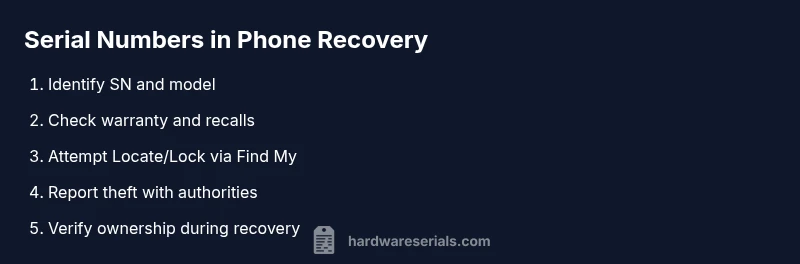
If a phone goes missing, act through legitimate channels rather than attempting to reverse‑engineer a location from the serial number alone. Start by enabling Find My iPhone or Find My Device on the device if possible, or contact the carrier to suspend service and flag the device. Gather the serial number, IMEI/MEID if known, model, color, and purchase details. File a police report with the facts and provide copies of receipts and the SN so authorities can verify ownership and assist with recovery or proper reporting. Finally, keep a detailed log of all actions and communications for follow‑up.
Verification and recovery workflow with serial numbers
Maintain a secure record of the device’s SN, model, color, and purchase date. Use the SN when requesting warranty status or service quotes from the manufacturer, and share it with your carrier during theft reports or device block requests. If recovery is possible through authorities, the SN can help verify ownership and ensure the right device is returned. In practice, SNs play a supporting role in recovery workflows, while IMEI and account-based controls drive the actual locate/lock processes.
Practical privacy concerns and best practices
Do not publish your serial number publicly or in insecure channels. Store SNs and receipts in a safe location, preferably digitally encrypted or in a dedicated catalog. When sharing device details with support teams, confirm you are communicating with legitimate representatives. Regularly review device security settings, enable remote lock and erase options, and use strong account passwords to prevent unauthorized access that could complicate a recovery attempt.
When to contact authorities and what information to provide
If your phone is stolen, contact local law enforcement and your carrier immediately. Provide the SN, IMEI (if known), model, purchase details, last known location, and any relevant timestamps. This information helps authorities file court‑admissible reports, coordinate with the manufacturer, and coordinate with the network provider to suspend service or block the device. Remember to document all steps you’ve taken for future reference and potential insurance claims.
AUTHORITY SOURCES
- https://www.consumer.ftc.gov/articles/what-to-do-if-your-phone-is-stolen
- https://www.fcc.gov/consumers/guides/identifying-your-device
- https://www.nist.gov/topics/identity
Tools & Materials
- Phone with packaging and receipt(SN should be legible on the box or inside the packaging insert)
- Device access to settings or packaging label(Where possible, locate SN from device menu or sticker on device back/battery cover)
- Account access (carrier or manufacturer portal)(Needed to validate ownership and activate tracking/lock features)
- Notebook or digital record for SN(Store in a secure place with purchase date and model details)
- Pen or device to copy SN accurately(Useful when transcribing SN to forms)
Steps
Estimated time: 30-60 minutes
- 1
Gather device identifiers
Locate the serial number on the device label, packaging, or in the device settings. Record the SN, make/model, color, and purchase date to ensure accurate identification when communicating with support or authorities.
Tip: Double‑check the SN against the packaging label to avoid misreporting. - 2
Identify legitimate recovery channels
Decide whether you will use built‑in tracking services (Find My/Find My Device) or contact the carrier for a block or locate request. SNs are for verification, but location relies on IMEI and network data.
Tip: If you still have access to the device, enable Find My/Find My Device immediately. - 3
Initiate location or lock procedures
If possible, trigger remote lock, locate, or erase features through the appropriate service. Notify the carrier to suspend service if theft is suspected to prevent unauthorized use.
Tip: Do not attempt to unlock a stolen device; this can complicate legal investigations. - 4
Report to authorities with SN details
File a police report and provide the SN, IMEI (if known), model, color, purchase date, and last known location. Documentation improves recovery chances and supports claims.
Tip: Keep a copy of the report and all correspondence for insurance claims. - 5
Verify ownership and pursue service options
Use the SN to verify warranty status and coordinate with the manufacturer for potential recall or replacement steps. Confirm with the carrier the device is blocked if stolen.
Tip: Only use official channels to verify warranty or replacement eligibility. - 6
Document and monitor
Maintain a log of all actions, responses, and outcomes. Monitor account activity and watch for unusual claims or requests related to the device.
Tip: Set up alerts for account changes or new device activations.
Frequently Asked Questions
Can a serial number help me track a phone’s location in real time?
No. A serial number does not provide live location data. Location tracking relies on IMEI/MEID, GPS, and network data.
No. Serial numbers don’t reveal a phone’s live location; use IMEI and Find My devices instead.
Where can I find the serial number on my iPhone or Android device?
On iPhone, check Settings > General > About to locate the serial number. On Android, go to Settings > About phone > Status. You can also find it on the original packaging or receipt.
You can find the serial number in the device settings or on the packaging and receipt.
What’s the difference between an IMEI and a serial number given my goal to recover a lost phone?
IMEI is used by networks to locate and identify a device on the cellular network; SN is used for warranty, ownership verification, and service history. For recovery, prioritize IMEI and account-based tracking.
IMEI is for network location; serial is for ownership and warranty checks.
If my phone is stolen, what should I report to the police?
Provide the serial number, IMEI (if known), model, color, purchase date, and last known location. Include any tracking or block actions you have initiated.
Give the police the SN, IMEI, model, color, and last known location to help investigations.
Is it safe to share my serial number with third parties?
Only share your serial number with trusted manufacturers, carriers, or law enforcement. Be cautious of phishing or scams that request SN details.
Share your SN only with trusted official parties and authorities.
Watch Video
Key Takeaways
- Serial numbers identify devices for verification, not live tracking
- Use IMEI and built‑in tools to locate or lock a lost phone
- SNs matter for warranty and ownership verification, not location data
- Act quickly: enable Find My devices and contact carriers when theft occurs
- Document every step for police reports and insurance claims