AirPods Pro Serial Number Lookup: Locate, Verify, and Interpret
Comprehensive guide to finding and interpreting the AirPods Pro serial number for authentication, warranty checks, and service history. Learn locations on the case, packaging, and iPhone, plus steps to verify legitimacy and avoid scams. 2026 edition by Hardware Serials.


According to Hardware Serials, airpods pro serial number is a unique identifier printed on the charging case lid and on the original packaging. You can also view it in iPhone settings by tapping the AirPods Pro entry under Bluetooth to reveal device details. This serial number is essential for verification, warranty claims, and service history, making accurate lookup crucial for DIYers and pros.
What is the airpods pro serial number?
The airpods pro serial number is a unique alphanumeric identifier assigned to each unit by Apple. It serves as a digital fingerprint for authentication, warranty eligibility, and service history. When you hear the phrase airpods pro serial number, think of it as the official record that ties a particular set of AirPods Pro to a specific production run, purchase, and support timeline. For DIYers and professionals, knowing this identifier helps verify product legitimacy, confirm warranty status, and streamline repairs. The serial number may appear in multiple places, including the device, packaging, and associated records. Recognizing where to look and how to read it reduces confusion during audits or claims, especially when handling multiple devices.
Where to locate the serial number on AirPods Pro and its packaging
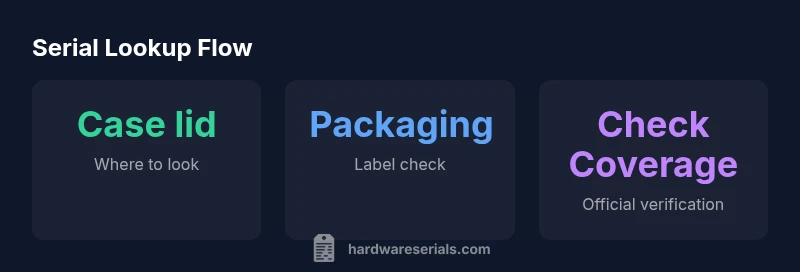
There are several reliable locations to find the airpods pro serial number. The primary spot is the underside of the charging case lid, near the hinge, where Apple prints a compact string. You can also locate it on the original retail packaging on a white label with the barcode. For a quick cross-check, connect your AirPods Pro to your iPhone, open Settings > Bluetooth, tap the info icon next to AirPods Pro, and view the serial number there. Always capture multiple sources: write it down, photograph the label, and record the number in your asset inventory. In some shipments, the serial may also appear on the invoice or receipt, which can help verify purchase details if the case label is damaged.
How to verify the airpods pro serial number for authenticity and warranty
Verifying a serial number involves cross-checking it across trusted sources. First, use Apple’s Check Coverage tool to confirm warranty status and service eligibility. Compare the serial against the packaging label, case lid imprint, and the Bluetooth details on your iPhone. If the serial does not match the device model or appears duplicated across multiple units, consider suspicions of counterfeit or replacement parts. The Hardware Serials team recommends keeping a log of the serial, purchase date, retailer, and any service events. This makes audits smoother and faster for technicians and DIYers alike. When in doubt, contact Apple Support with the serial handy and explain the issue; use a professional approach rather than posting publicly.
Common mistakes when dealing with airpods pro serial numbers
Many issues arise from misreading digits, confusing the AirPods Pro model number with the serial, or assuming the serial is printed only on one part of the device. Do not rely solely on the case lid imprint if the lid is damaged; always check packaging and Settings. Be mindful that some regional or refurb units may have altered labeling; confirm with official records. Finally, avoid sharing serial numbers in public forums or social media, as scammers can misuse this information to spoof warranties or commit identity theft.
Practical tips for recording, storing, and using serial numbers in service workflows
Create a standardized serial-number record for every AirPods Pro unit you manage. Include fields for the serial, purchase date, retailer, purchase price, warranty status, repair history, and any firmware or model notes. Store this data in a centralized, secure location accessible to technicians and project leads. When performing repairs or audits, use the serial to pull up Check Coverage details and compare with your internal records. For teams, incorporate a quick-check checklist to ensure the serial aligns with the device if replaced parts are involved. Regularly audit your serial inventory to catch mismatches early and reduce turnaround times for service tasks.
Interpreting serial-number data: what the serial tells you about manufacture date and model
AirPods Pro serial numbers can sometimes include batch information or date codes that help narrow production windows. Use this information in combination with model identifiers (like generation and case color) to determine the exact variant. While Apple does not publicly publish a universal decoding scheme for all serials, many service tools interpret common patterns to estimate production periods and firmware baselines. Treat a date-related code as a guide rather than a definitive manufacture date, since codes can be region-specific and updated across generations. Cross-reference with the box and receipt for the most accurate picture.
Data privacy and best practices when handling serial numbers
Because serial numbers uniquely identify a device, treat them as moderately sensitive information. Share them only with Apple Support or authorized service providers through official channels. Avoid posting serials in public forums, spreadsheets with access controls, or customer portals unless encryption and access controls are in place. When documenting serial data in reports, redact any personal identifiers and reference the device model and purchase context instead. By following these practices, you protect owners and minimize risk for service teams handling airpods pro serial numbers.
Common locations for the airpods pro serial number
| Location to Find | What to Check | Notes |
|---|---|---|
| Charging case lid | Serial printed under lid near hinge | Match with packaging when possible |
| Original packaging label | Serial printed on white sticker | Store with receipts for future reference |
| Bluetooth settings on iPhone | AirPods Pro info → Serial Number | Use for quick cross-check if the case is unavailable |
Frequently Asked Questions
Where can I find the airpods pro serial number?
The serial number appears on the underside of the AirPods Pro charging case lid and on the original packaging. You can also view it in iPhone Settings under Bluetooth details for your AirPods Pro.
Find the serial number on the case lid, on the packaging, or in Bluetooth settings on your iPhone.
Is it safe to share my AirPods Pro serial number?
Share only with authorized service providers or Apple support. Do not post serial numbers publicly to protect against fraud.
Only share with trusted service providers; avoid public posts.
Can counterfeit AirPods have valid serial numbers?
Yes, counterfeiters may replicate serial patterns. Always verify with Apple’s Check Coverage and compare with packaging and receipts.
Yes, counterfeit numbers exist; verify with official records.
What can a manufacture date code tell me?
Some devices include a manufacture date or batch code that helps narrow production windows. Use this with the serial for better traceability.
Date codes help estimate production time; cross-check with receipts.
How do I check warranty status using the serial number?
Use Apple’s Check Coverage page and enter the serial number. This confirms warranty status and eligible service options.
Check coverage on Apple’s site with the serial.
Can I identify the model or generation from the serial number?
Serials plus model numbers can reveal generation. Use official support tools to interpret the data accurately.
Serial + model helps identify exact version via official tools.
“Serial numbers are the frontline for authenticity checks and warranty validation; always verify against official records using the serial in the iPhone's Bluetooth settings or packaging.”
Key Takeaways
- Locate the serial across case lid, packaging, and Settings
- Verify against official Apple records to confirm authenticity
- Record serial data with purchase details for warranty tracking
- Do not share serial numbers publicly to protect owners