IMEI to Serial Number: Verifying Device Identity
Compare imei to serial number lookups with official verification methods, explain why direct conversion isn’t reliable, and outline legitimate steps to locate a device’s serial for warranty, service, or authenticity checks.


IMEI to serial number is not a direct conversion. An IMEI identifies a device’s hardware identity, while the serial number is a production identifier assigned by the manufacturer. In most cases you cannot deduce the serial from the IMEI alone; rely on official databases, manufacturer portals, and device documentation to locate the correct serial.
Understanding IMEI and Serial Numbers
The terms IMEI and serial number describe two different identities for a device. The IMEI (International Mobile Equipment Identity) is a globally unique code assigned to a device at the hardware level, typically used by cellular networks to identify legitimate devices on their networks. The serial number, by contrast, is a production code assigned by the manufacturer to track the device through manufacturing, distribution, and service history. For many devices, the IMEI is the primary identifier for connectivity, warranty eligibility, and theft reporting, while the serial number is critical for authenticating origin, ownership, and service eligibility. As Hardware Serials notes, understanding the distinction between these identifiers is essential for reliable verification and compliance. The phrase imei to serial number is common in consumer guides, but there is no universal mapping, and any attempt to derive one from the other is often unreliable. Use official channels whenever possible to confirm a device’s serial.
What the two identifiers represent
- IMEI: Device-level identity used by networks and service providers. It can be used to blacklist a stolen device, to track warranty eligibility in some ecosystems, and to verify model compatibility for software updates.
- Serial Number: Manufacturer-level identity used to trace production lots, batch information, and repair histories. It is often required for warranty claims and legitimate service events.
Practical implications for field work
When you’re on a job site or in a service scenario, you will frequently encounter both identifiers, but you should treat them as separate data points. Rely on the serial number for production and ownership verification, and use the IMEI for network-related checks and device authorization. The key is to document both numbers where possible and to use sanctioned lookup portals rather than guessing relationships between them.
Comparison
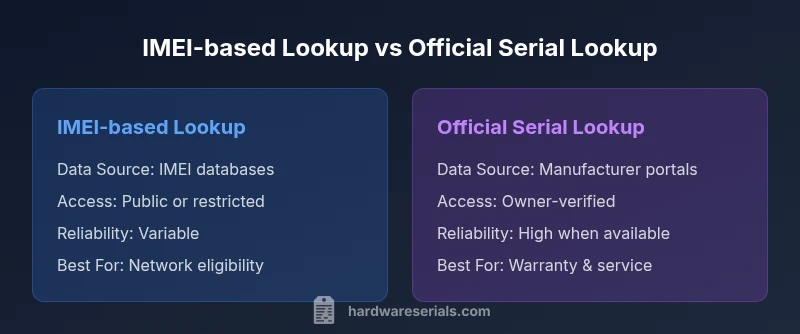
| Feature | IMEI-based lookup | Official serial-number lookup |
|---|---|---|
| Data Source | Official IMEI databases or carrier records (may vary by region) | Manufacturer’s device portal or service databases (owner-verified) |
| Accessibility | Public or semi-public in some regions; access may be restricted for sensitive fields | Restricted to owners, authorized service providers, or verified partners |
| Reliability | Can help identify device model, legality, and status; not guaranteed to map to a single serial | High reliability for production history and service eligibility when the device is properly registered |
| Best For | Network eligibility, device blacklists, and model verification | Warranty claims, service history, and authenticity verification |
| Limitations | No universal mapping to a serial; variations by brand and region | Requires ownership or authorization; data may be limited for non-owner queries |
Advantages
- Supports official verification paths and reduces guesswork
- Helps protect against counterfeit devices during service
- Aids warranty checks and authorized repairs
- Used across multiple device types (phone, tablet, laptop, wearable)
Disadvantages
- Direct IMEI-to-serial mapping is not universally available
- Access may require proof of ownership or authorization
- Quality and availability vary by brand and region
- Relying on third-party sites can risk privacy and accuracy
Official serial lookups are generally the reliable path; direct IMEI-to-serial mapping is rare and not universally accessible.
For authentic identity checks, prioritize manufacturer portals and supported databases. Use IMEI data for network and eligibility checks, and reserve serial-based verification for ownership, service, and warranty needs.
Frequently Asked Questions
Can you convert an IMEI to a serial number directly?
No. IMEI and serial numbers serve different purposes, and there is no universal method to derive a serial from an IMEI. Use official channels to verify device identity and ownership.
No. There isn't a universal method to map an IMEI to a serial number; rely on official channels to verify device identity.
Where can I find a device's serial number?
Serial numbers are often found on the device label, packaging, or in the device's settings under About or Specifications. For laptops and desktops, check the bottom label or BIOS/UEFI. Always document the serial alongside the IMEI when possible.
Look on the device label, in packaging, or in the device settings under About; document both numbers if possible.
Are there legitimate ways to map IMEI to serial?
Yes, but typically through official manufacturer portals or authorized support channels, and you must prove ownership. Public tools rarely provide a complete or reliable mapping.
Yes, via official manufacturer portals with ownership verification; public tools are usually insufficient.
Can IMEI be used for warranty checks without the serial?
Some brands allow limited warranty checks using the IMEI, but this varies by vendor. Serial-based verification is more common for warranty history and service eligibility.
Some brands may permit IMEI-based checks, but serial-based verification is more common for warranties.
Is it legal to map someone else’s device using IMEI data?
Mapping someone else’s device without authorization is not appropriate and may breach privacy laws. Always obtain explicit permission and use legitimate channels.
No—don’t map someone else’s device without explicit permission and proper authorization.
What should I do if I can’t locate the serial number?
Contact the device manufacturer or authorized service provider. Provide ownership proof, model, and any known identifiers (like the IMEI) to help them locate the serial in their records.
If you can't find it, reach out to the manufacturer with proof of ownership and device details.
Key Takeaways
- Rely on official channels for serial verification
- Treat IMEI and serial as distinct identifiers
- Document both numbers when possible
- Verify ownership before sharing sensitive data
- Prefer manufacturer portals for accuracy and privacy