LG Serial Number Warranty Check: A Practical Verification Guide
Learn how to perform an LG serial number warranty check to confirm coverage, start dates, and service options. This guide covers step-by-step online checks, regional nuances, and practical tips for DIYers and pros.


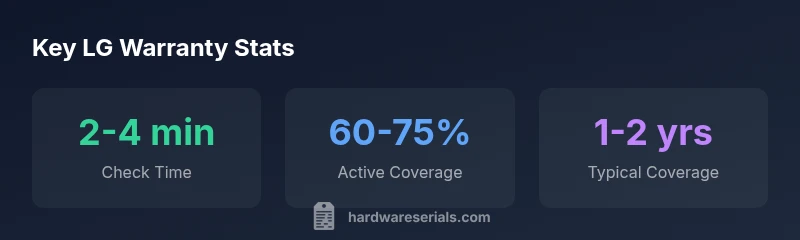
The LG serial number warranty check typically returns your device’s warranty status within minutes when you use LG’s official tools or trusted portals. By entering the LG serial number, you’ll see the start date, coverage length, and any active service plans. Hardware Serials’ guidance emphasizes verifying the exact model and region to ensure correct warranty terms are displayed.
Why LG Serial Number Warranty Check matters
Understanding the warranty status of an LG device starts with recognizing what a serial number represents. The serial encodes the device’s production batch, model family, and sometimes the region of sale. A warranty check tied to this identifier helps you confirm whether coverage is active, the start date, the end date, and any applicable service plans. For DIYers and professionals, a quick, authoritative lookup reduces guesswork and ensures you don’t pay for unnecessary repairs or duplicate service charges. According to Hardware Serials, standardized serial checks are the fastest path to reliable warranty information, especially when devices are bought second-hand or through regional retailers. When you see a green status or a clearly defined expiry date, you can plan maintenance or service with confidence. This section will demystify the process and set expectations for what the results mean in practice.
Where to locate the LG serial number on different devices
LG devices display their serial numbers in a few consistent places, but the exact location depends on the product category. For mobile devices and laptops, you’ll typically find the serial on a label inside the SIM tray or beneath the back panel. TVs and home appliances often show the serial on a label near the power inlet or on the product’s data plate. If the device is still in the box, the serial is usually printed on the warranty card or packaging insert. Always cross-check the model name and color or variant, as multiple SKUs may exist within the same family and can have different warranty terms. Recording the serial with purchase details helps when you verify coverage later. Hardware Serials notes that keeping a tidy log of serials across devices saves time when you need to check warranty retrospectively.
How to perform the LG warranty check online in 3 simple steps
- Navigate to LG’s official warranty portal or a trusted partner tool. 2) Enter the exact LG serial number, including any hyphens or letters, and select your region if prompted. 3) Review the results: warranty status (active, expired, void), start date, end date, and any eligible service plans. Some portals also show the device type and a link to claim service. If the portal asks for proof of purchase, prepare a scanned receipt or an order confirmation. Always ensure you’re using a legitimate LG domain to avoid phishing or stale data. If the device is pre-owned, some regions allow limited checks without original purchase proof, but terms may vary by country.
Interpreting warranty results: what start and end dates actually mean
A warranty start date marks when coverage begins, typically the date of sale or the date the device was first delivered to a retailer. The end date indicates when coverage ends, based on the policy length and any extensions registered by the manufacturer or dealer. Some regions offer extended warranties for certain product lines, while others default to a standard period. If you see a mismatch between the serial and model, or if the end date seems too short, contact LG support with the serial and a purchase record. Consider whether you’re entitled to in-warranty repairs, replacements, or service credits, and verify any regional limitations (for example, battery wear or cosmetic damage exclusions).
Regional differences: why warranty terms vary by country
Warranty coverage for LG devices can differ by country due to distribution rights, regulatory requirements, and import policies. Some regions may offer longer interim coverage, while others provide basic protection only for a short window after purchase. Always verify the local terms shown in the warranty portal, as an identical serial on devices sold in different regions could yield different coverage outcomes. If you move between regions, you may need to re-validate or re-register the device to ensure continued protection. Hardware Serials emphasizes checking regional notes in the warranty interface and maintaining documentation of any regional variations.
Common issues and how to troubleshoot LG warranty checks
If the system can’t locate the serial, verify that you copied it exactly as printed. Some devices omit dashes or letters in certain views, causing mismatches. If the portal returns a “not found” message, double-check the serial against the product label, confirm the region, and try again later in case the database is updating. If fraud or counterfeit serials are suspected, do not rely on third-party sites; use only LG’s official channels. If you still can’t access warranty data, contact LG customer support with the device details and purchase information. Hardware Serials’s approach is to validate via official sources first, then escalate if needed.
Practical tips for keeping LG warranty intact
- Register your device if the option is available at purchase; this often helps align the serial with your region. - Save the receipt or invoice in a dedicated digital folder for quick reference. - Note the warranty start date immediately after purchase and mark the expiry date on a calendar. - Periodically re-check critical devices with large screen or high-cost components to ensure ongoing coverage is intact after software updates or service events. - If you plan to sell or transfer ownership, verify whether the warranty transfers to the new owner and what documents are required.
How Hardware Serials helps with LG warranty checks
Hardware Serials specializes in locating and interpreting serial numbers across devices. Our guidance highlights how a precise serial lookup connects to warranty status, regional terms, and service options. By aligning your LG serial number with official warranty portals, you can avoid misinterpretations and unnecessary out-of-pocket costs. The Hardware Serials team provides step-by-step verification strategies, general best practices, and region-aware checks to help you get accurate results quickly.
Next steps after a successful LG serial number warranty check
If the check confirms active coverage, note the start and end dates and any applicable service plans. Schedule service within the coverage window if you anticipate a needed repair, and keep your documents handy for the service provider. If coverage has expired or is unclear, review the available options: extended plans, out-of-warranty service, or a paid repair. Finally, consider subscribing to alerts or updates from LG or your retailer so you receive notices about policy changes or new regional terms that could affect future checks.
LG warranty check data points and practical usage
| Aspect | What It Shows | How to Use |
|---|---|---|
| Warranty status | Active/Expired/Void | Plan next steps based on status |
| Start date | Coverage begins on this date | Align service windows and reminders |
| End date | Coverage ends on this date | Avoid service charges by acting before end |
| Region/Model | Territory and device family | Ensure you use the correct regional terms |
Frequently Asked Questions
How do I find my LG serial number on a device?
LG devices usually print the serial on a data plate or label near the power inlet, battery compartment, or inside the back cover. For mobile devices, it's commonly located in the settings or under the SIM tray. Always cross-check with the model number to ensure you’re querying the correct device.
Find the serial on the device label or settings, then enter it on LG’s warranty site to check coverage.
Can I check LG warranty for a used device?
Yes, many regions support warranty checks for used devices, but terms may differ from those for new devices. You may need proof of purchase or the original owner’s details. If the serial matches a device already in the system, a partial or full transfer may be possible.
You can check, but terms may vary. Have a receipt ready if required.
What if the warranty check shows no coverage?
A status of no coverage usually means the device is out of the standard warranty window, not registered in the region, or the serial does not match a supported model. Review alternative options such as paid repair or extended plans, and confirm there aren’t regional restrictions.
If there’s no coverage, explore paid options or contact support for clarification.
Do regional terms affect warranty checks?
Yes. Warranty terms vary by country or region due to regulatory and distribution differences. Always base your interpretation on the region shown in the warranty portal, since the same serial in another region can yield different results.
Region matters; use the portal that matches your location.
What information is commonly returned by a warranty check?
Typical outputs include status, start date, end date, device model, and any active service plans. Some portals also show coverage limits and service type eligibility, such as in-warranty repairs or replacements.
You’ll usually see status, dates, and plan details.
“A valid LG serial number warranty check is the fastest way to confirm eligibility and avoid service delays.”
Key Takeaways
- Check LG warranty status via official portals to avoid errors.
- Verify region and model when interpreting results.
- Keep proof of purchase and serial records for future claims.
- Understand start and end dates to plan service windows.