LG TV Serial Number Search: Locate, Verify, and Record
Learn how to locate, read, and verify the serial number on LG TVs. This guide covers model ID, label locations, official sources, and best practices to support your lg tv serial number search.


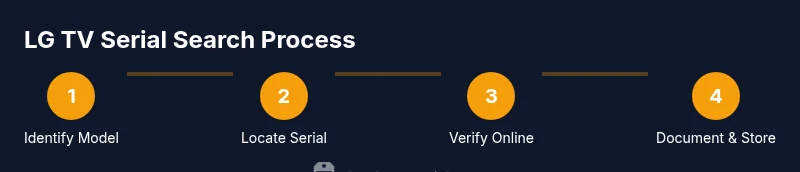
You can perform an lg tv serial number search to locate and verify your LG TV’s serial for warranty, service, or parts. The process requires your TV model number, the physical serial label, and access to LG’s official support resources. Start by identifying the model, then locate and record the serial.
LG TV serial number search basics
A serial number is more than just digits; it’s the key to warranties, service history, and authenticity checks for your LG TV. If you’re performing an lg tv serial number search, you’ll want a systematic approach that minimizes errors and avoids wasting time on non-official sources. The hardware ecosystem for modern LG televisions often hides the serial in multiple locations, and the exact format can vary by year, model, and region. The purpose of this block is to build a foundation: what serial numbers are, why you should care, and where to begin. According to Hardware Serials, the most reliable searches start with official sources—LG’s support site, the user manual, and the TV’s on-screen menus. Before you do anything else, gather your essentials: the TV model, a clear photo of the label, and access to LG’s warranty tools. This reduces back-and-forth and helps you avoid counterfeit or outdated information. Throughout this guide we’ll use the lg tv serial number search as the central task and show you how to verify the number against LG’s official databases, how to interpret common code patterns, and how to document the result for future service, resale, or warranty claims. If you’re working with a professional team, this approach also provides a consistent audit trail that’s easy to share. The aim is clarity, accuracy, and a quick path from discovery to verification, so you can move on to supporting tasks with confidence.
Hardware Serials’ broader guidance emphasizes starting with official sources to reduce risk and ensure the data you collect is trustworthy.
Where to find the serial number on LG TVs
LG TV serial numbers are usually printed on a label affixed to the chassis, but the exact location can vary by model. Common placements include the back panel, the side edge of the TV, or beneath the stand mount. If the label isn’t visible from behind, you can often find the serial via the on-screen menu: Settings > General > About This TV, or by pressing and holding the Menu button in some older models. The serial number is typically a mix of letters and digits, often with a hyphen or space separator. For newer LG OLED and NanoCell models, manufacturers increasingly encode region, model year, or production line within the sequence. When you locate the label, photograph it clearly, ensuring all characters are legible. If the label is damaged, proceed to the Settings route to confirm the model and cross-check with any documentation that accompanied the TV at purchase.
Knowing where to look reduces errors and speeds up the lg tv serial number search.
How to locate the serial number on different LG TV models
Not all LG TVs place the serial number in the same location. For many wall-mounted or pedestal-mounted sets, the back panel will have a sticker or etched imprint. Some models use a detachable stand with a label under the base; others hide the label under a removable panel on the rear. OLED and newer NanoCell series often show the serial within the Settings menu as a reliable alternative if the exterior label is inaccessible. If you’re unsure, consult the user manual for your exact model, or search LG’s official support site using your model number. When taking photos, capture the entire label including the model number and barcode; this ensures you have a complete reference for the lg tv serial number search. If multiple labels exist, verify that the model and serial correspond to the same unit before proceeding with verification.
Conducting an efficient lg tv serial number search (online + offline)
With the serial in hand, an efficient search uses both offline verification and official online databases. Start by visiting LG’s official support portal and entering the model number to locate the corresponding serial database or warranty checker. Cross-check the serial string against the label to confirm accuracy. If the serial cannot be found on the LG site, use a bundled verification approach: consult the TV’s settings, cross-reference the model number with the original purchase receipt, and consider contacting LG support with your serial handy. This dual path—offline label verification plus online official lookups—reduces the risk of misidentification and ensures you have a verified serial for warranty status, repair history, or authenticity checks. Keep a copy of the verified serial and the search log for future reference and audits.
This method aligns with Hardware Serials’ recommended practices by emphasizing official sources and thorough documentation.
Interpreting serial numbers: what the digits can reveal
LG serial numbers often encode useful information beyond a simple identifier. In many brands, the digits and letters reflect the model family, production year, and manufacturing location. While the exact encoding schemes can vary by year and region, you can commonly infer a few details by comparing serial patterns across units of the same model. For example, a date code embedded in the sequence might hint at production month and year, while a region code can identify the market where the TV was intended for sale. Understanding these patterns can help you verify the unit’s age, confirm authenticity, and determine warranty eligibility. Because LG’s serial formats have evolved across generations, it’s important to rely on official documentation and cross-check with LG support tools. Hardware Serials notes that familiarity with these patterns makes lg tv serial number search more efficient and safer, especially when handling multiple TVs in bulk or in a professional setting.
Verification workflow: official sources and best practices
Verification should always start with LG’s official resources. Use LG’s support portal to confirm warranty status, service eligibility, and product-specific lookup tools. When you perform an lg tv serial number search, enter the model number and then paste or type the serial exactly as it appears on the label. If the official portal returns a match, record the status alongside the purchase date and retailer information. If no match is found, contact LG customer support with your serial, model, and a proof of purchase. In some cases, regional databases require a different language locale or regional code; ensure you select the correct region before submitting a query. For professionals, maintain a structured log of searches with dates, model, serials, and outcomes. This creates an auditable trail that can help with warranties, repairs, and resale. The Hardware Serials team recommends keeping your serial records in a secure, backed-up location and updating them as new information becomes available.
This approach minimizes ambiguity and maximizes accuracy when performing lg tv serial number search.
Best practices for recording and safeguarding serial data
Once you’ve verified a serial, store it in a safe, organized system. Use a consistent naming convention for each unit (e.g., Model-YYYYMM-Serial), back up the data to a cloud service, and keep purchase receipts accessible. When sharing serial information in audits or service tickets, redact sensitive fields only if required by policy, and preserve the full string for verification purposes. For teams managing multiple LG TVs, adopt a centralized inventory procedure that ties serial numbers to model numbers, purchase dates, and warranty expiration. Regularly cross-check database entries against LG’s official portals after major service events or firmware updates—serials can sometimes be updated or re-labeled during refurbishing or repair.
AUTHORITY SOURCES
To support your lg tv serial number search with trustworthy information, consult official and reputable sources. Here are three authoritative references:
- https://www.consumer.ftc.gov/articles/warranties
- https://www.nist.gov/
- https://ieeexplore.ieee.org/
Tools & Materials
- TV model number(Shown on the TV label or Settings > General > About This TV)
- Serial number label or sticker(Located on the chassis/back/stand; photo recommended)
- Smartphone or camera(Capture clear photos of the labels)
- Purchases receipts or proof of purchase(Helpful if verifying warranty or regional eligibility)
- Notebook or digital note system(Record serial, model, date, and search outcomes)
- Access to LG official support site(Needed for official verification and warranty checks)
Steps
Estimated time: 30-45 minutes
- 1
Identify model and collect identifiers
Locate the TV model number and prepare a clear photo of the serial label unless it’s accessible via the settings menu. Having the exact model is essential to narrow down the correct lookup path.
Tip: Double-check that the model and serial belong to the same physical unit. - 2
Find the serial number on the hardware
Inspect the back panel, sides, or the detachable stand to locate the serial sticker. If the label is under a panel, gently open it following the user manual instructions.
Tip: If the label is damaged, photograph the best-possible alternate exterior location. - 3
Capture and transcribe the serial
Take a high-resolution photo of the serial, ensuring every character is legible. Transcribe the string exactly as shown, including any hyphens or spaces.
Tip: Cross-check the transcription by reading the label aloud to catch misreads. - 4
Verify via official LG resources
Visit LG’s official support portal, enter the model number, and locate the warranty/serial verification tool. Paste or type the serial accurately and confirm status.
Tip: Use the regional site if prompted; some databases require locale selection. - 5
Cross-check against other records
If you have receipts or retailer data, match purchase date with warranty eligibility. Ensure the serial in every record aligns with the unit you own.
Tip: Document any discrepancies and contact LG support with photos if needed. - 6
Document and secure the result
Store the verified serial and model in a secure inventory file, noting the verification date and result. Keep backups.
Tip: Establish a consistent naming convention for future lookups.
Frequently Asked Questions
Where is the serial number on an LG TV usually located?
Most LG TVs place the serial on a back or side label, or within Settings > General > About This TV. If the exterior label is unreadable, use the Settings menu to confirm the model and cross-check with LG support.
Typically, the serial is on the back or side label, or in the TV settings under General. If the label is unreadable, check the Settings menu for the serial tied to your model.
Do I need the model number to search the serial online?
Yes. The model number anchors the search to the correct database. Without it, you may have to contact LG support for a manual lookup.
Yes. The model number helps you find the right database. Without it, you might need to contact LG support for a lookup.
Is it safe to search serial numbers online?
Stick to official LG portals and reputable sources. Avoid third-party sites that may misrepresent your serial or provide outdated information.
It's safest to use LG's official site and reputable sources. Avoid unreliable third-party sites.
How can I verify a serial number with LG?
Enter the model and serial on LG’s official warranty or support lookup. If there’s no match, contact LG customer support with your evidence.
Enter the model and serial on LG’s official lookup. If nothing matches, reach out to LG support with your evidence.
What if the serial label is damaged or unreadable?
Use the model number from the Settings menu or purchase documents to confirm the unit’s identity, then contact LG support for guidance on obtaining or validating a replacement serial.
If the label is unreadable, use the Settings data or receipts to confirm, and contact LG for help with verification.
Watch Video
Key Takeaways
- Identify the exact model first to guide the search.
- Use official LG resources for verification.
- Document serials with photos and a log.
- Keep records secure for warranty and service needs.