LG Serial Number Search: Find, Verify, and Understand Your Device
Learn where to find LG serial numbers, how to verify them online, and what the results mean for warranty and service. A concise, practical guide for DIYers and pros.


LG serial number search refers to locating the unique serial on LG devices (TVs, appliances, soundbars) and using official LG tools or reputable databases to verify model, manufacture date, and warranty status. Start by finding the label, then enter the serial on LG's support site or contact hardware professionals for guidance.
LG serial number search landscape
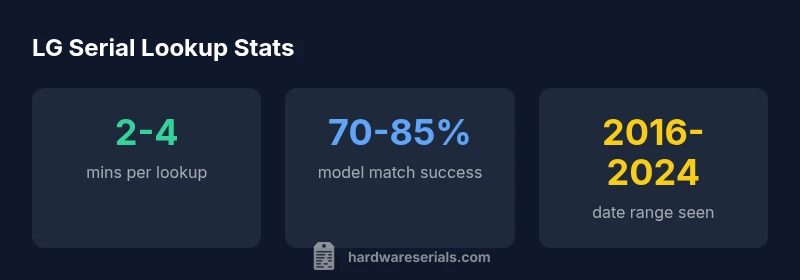
For DIYers and professionals, the LG serial number search is a routine task that underpins warranty checks, service eligibility, and device provenance. According to Hardware Serials, the value of a lookup largely depends on where you start and which official tools you use. This section explains why serials matter across LG TVs, appliances, and audio gear, and how a disciplined lookup workflow reduces ambiguity when diagnosing issues or requesting support. You’ll learn how serial data is used by technicians, warranty departments, and asset managers, and how a clear process minimizes misidentification of a model or a component. The goal is a quick, reliable verification path that you can apply to most LG products in minutes, not hours.
Locating the serial number on LG devices
Locating the serial number on LG devices is often straightforward but can vary by product category. On most TVs, look at the back panel or stand base label. On refrigerators and washers, check inside the door frame or behind removable panels. For soundbars and portable devices, labels may be on the bottom, inside the battery compartment, or under the removable cover. When the device is mounted or wall-fixed, the serial may be found in the user manual’s warranty section, or in the device’s firmware screen in some models. Important: write down the exact characters, noting any letters that can be easily confused (O vs 0, B vs 8). A clean photo helps avoid transcription errors during a lookup.
Distinguishing serial numbers from model numbers
A common source of confusion is mistaking the model number for the serial. The model identifies a product version or generation, while the serial identifies a specific unit within that model line. Serial numbers are usually unique per unit and are required when claiming warranty, requesting service, or verifying authenticity. When in doubt, cross-check: the model number will appear on product packaging, manuals, and the LG website, while the serial should be on the device label and matched to your purchase receipt. Developing the habit of separating the two ensures accurate lookups and faster support.
Using LG official tools for verification
Official LG verification tools form the most reliable source of truth. Start by locating the serial on your device, then navigate to LG's support portal or the LG MyAccount area. Enter the serial number exactly as shown, select the device category, and submit. The tool typically returns model confirmation, warranty status, manufacture date or date code, and service options. If your region supports it, you may also compare the serial against LG’s genuine parts database or register the device for extended coverage. Always confirm the results against your original purchase receipt and retailer records.
What the serial reveals: warranty, manufacture date, and more
Serial numbers can reveal critical details about a unit’s lifecycle. In many LG devices, data fields attached to the serial help determine eligibility for repairs, recalls, or part compatibility. The manufacture date (or date code) helps estimate remaining warranty windows and plan maintenance. In some product lines, the serial also encodes regional variant information, which can affect firmware updates or feature availability. Understand that decoding the exact date or batch often requires an official decoder tool or the device’s service manual, but the lookup results typically provide a trustworthy summary you can act on immediately.
Common mistakes and how to avoid them
To improve accuracy, avoid these common mistakes: typing the serial with extra spaces, using an image instead of a clear text entry, or choosing the wrong device category in the verification tool. Misreading characters due to font ambiguity or device lighting can lead to wrong matches. Always copy the serial exactly from the label, double-check the label location, and verify the device’s model number in the packaging or warranty card. If the lookup fails, try again with a fresh photo, check regional availability, and consider reaching out to LG support for confirmation.
Third-party databases: when to use them
Third-party databases can supplement LG lookups, especially when a device lacks a legible label or you’re trying to verify cross-model compatibility. However, these databases vary in accuracy and update frequency. Use them cautiously and always corroborate findings with LG’s official verification tools or your retailer’s records. If a third-party site claims a warranty or recall status, cross-reference with LG’s site first. Treat third-party results as discovery aids rather than primary sources of truth.
A practical lookup workflow for DIYers and pros
Follow this streamlined workflow to perform a reliable LG serial lookup:
- Locate the serial number on the device label and confirm characters.
- Identify the device category (TV, refrigerator, washer, etc.).
- Open LG’s official verification tool and enter the serial exactly.
- Review the results for model confirmation, warranty status, and manufacturing date.
- Cross-check with your purchase receipt, original packaging, and retailer URL if available.
- Save or photograph the results for future service or resale.
- If discrepancies arise, escalate to LG support with proof of purchase and serial photo.
Interpreting results and next steps
Interpreting the lookup results correctly saves time and prevents over-purchasing parts or misdirected service requests. If the tool shows an active warranty, note the warranty period and required service steps. If the date code suggests an expired warranty, plan for out-of-warranty repair options or part replacements. For recalls or known issues, follow LG’s recommended procedures and contact authorized service providers. Document the serial, model name, purchase date, and your lookup timestamp to build a reliable service history for future needs.
LG Serial Lookup Reference Table
| Device Category | Where to Find Serial | Purpose of Lookup | Official Tool |
|---|---|---|---|
| TV/Monitor | Back panel or stand label | Verify model and warranty | LG Support Check |
| Refrigerator | Inside door frame label | Check parts compatibility and warranty | LG Support Portal |
| Washer/Dryer | Door frame label or control panel | Confirm service eligibility | LG Customer Support |
Frequently Asked Questions
Where can I find the LG serial number on my device?
In most LG devices, the serial is on a label attached to the back, bottom, or inside doors. Some models hide the label behind removable panels or inside the user manual's warranty section. Always ensure you copy the exact characters and avoid confusing letters.
Check the back or bottom label, or inside the door frame. If you’re unsure, photograph the label and compare characters carefully.
Is there a difference between LG serial numbers and model numbers?
Yes. The model number identifies the product version, while the serial number uniquely identifies a single unit. Use the model number for product specs and the serial for warranty, service, and authenticity checks.
Serial numbers point to a specific unit; model numbers indicate the product version.
Can I verify LG serial numbers online?
Yes. Use LG’s official verification tools on the LG Support site or MyAccount. Enter the serial exactly as shown and review the results for model match, warranty status, and date codes.
Go to LG’s official site and enter the serial to confirm model and warranty.
What if the serial number is missing or unreadable?
Reach out to LG support with purchase details and photos of any labels. They can advise on next steps, including replacement labels or alternative lookup methods.
If the label is unreadable, contact LG with proof of purchase for guidance.
Do LG serial numbers encode manufacture date?
Some LG serials encode a date or batch code. Decoding often requires an official decoder tool or LG service manual. The lookup results usually provide a date code or manufacture range for practical use.
Many serials include a date code; use LG’s decoder or official guides for exact dates.
Are third-party databases reliable for LG serial lookup?
Third-party databases can help in some cases but should be corroborated with LG’s official tools. They vary in accuracy and update frequency, so treat them as supplementary.
Use third-party sources cautiously and confirm with LG’s official tools.
“Accurate LG serial number lookups hinge on confirming the unit label and using LG's official verification tools. Always corroborate results with purchase records.”
Key Takeaways
- Locate the serial accurately using the device label.
- Use official LG tools first for verification.
- Treat serial numbers as unit-specific identifiers.
- Cross-check results with purchase records and retailer data.
- Document serials for warranty and service history.