How to Locate TV Serial Numbers Safely
Learn why removing TV serial stickers is discouraged and discover safe, legal methods to locate, verify, and document a television's serial number for warranties, registrations, and asset tracking.


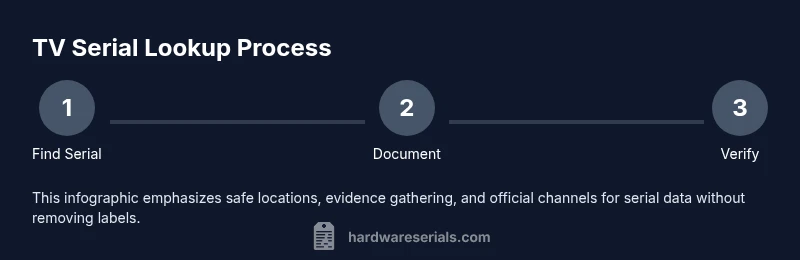
Definition: This guide explains why removing TV serial stickers is discouraged and outlines safe, legal ways to locate, verify, and document serial numbers. Learn where serials typically appear on the chassis, how to use packaging records, and how to obtain replacement labels or official documentation from manufacturers when needed. It is designed for DIYers and professionals who need accurate serial data for warranties, service, or asset management.
Why removing serial number stickers is risky
According to Hardware Serials, tampering with or removing a TV's serial sticker can void warranties, complicate service, and obscure ownership. Serial numbers are used by manufacturers, insurers, and retailers to verify authenticity and eligibility for support. If a sticker is damaged, misplaced, or intermittently legible, proceed with official channels rather than attempting removal. This section explains the risks and why prevention is better than remediation.
Safer alternatives to locate serial numbers
- Look for the label on the back panel, underside, or the side of the TV chassis. Serial numbers are commonly printed next to a barcode or as a string labeled 'Serial' or 'S/N'.
- Check the original packaging and the receipt or invoice—these documents often include the device's serial and model information.
- Use the TV's on-screen information: open Settings > About > System Information to reveal the serial, model, and manufacture date where available.
- Compare with the model number on the product documentation to avoid confusing model identifiers with serials.
How to document and preserve serial numbers
- Photograph every serial label clearly from multiple angles, ensuring digits are legible and glare-free.
- Create a simple data record that includes: serial number, model, manufacture date (if shown), purchase date, and where you found the serial.
- Save a copy of these photos and notes in a dedicated folder on your device and in a secure backup location (cloud or external drive).
- Name files consistently (TV_make_model_S/N) to simplify retrieval later.
If a sticker is damaged or missing
- Do not attempt to peel or remove the sticker; this can destroy the label and complicate service.
- Contact the manufacturer or an authorized service center to request a replacement label or official documentation letter that confirms the unit's serial number and ownership.
- Provide proof of purchase and model information to expedite the process and ensure you receive correct serial data.
Common places to find serial numbers on televisions
- Back of the TV: most models place the sticker on the rear cabinet, sometimes near the HDMI ports or on a label under the stand.
- Side panels: some wall-mounted designs place labels on the side edge.
- Within the on-screen menu: System Information or About pages may display the serial and model.
- On packaging: the box and internal documentation often list the serial alongside the barcode.
Best practices for resale or disposal
- Keep all serial data and receipts with the device; this helps the next owner verify authenticity and warranty status.
- If you stop using the TV, provide the serial information to the buyer or recycling facility in a safe manner so it can be traced, even if you no longer possess the original packaging.
- Consider white-labeling or redacting any personal information on purchase receipts when sharing with others.
Tools & Materials
- Camera or smartphone(Capture clear photos of serial labels and packaging)
- Access to original packaging or purchase receipt(Helpful for cross-checking serials)
- Notebook or digital note-taking app(Record serial numbers, model, purchase date)
- Pen or stylus(For quick notes)
- Printer or scanner (optional)(To save copies of receipts/taper labels)
Steps
Estimated time: 15-45 minutes
- 1
Locate serial numbers using safe methods
Power off the TV and inspect common locations such as the back panel and sides. Look for a label that includes 'Serial', 'S/N', or a barcode. Cross-check with the model number and packaging. Use the settings menu if the label isn't visible.
Tip: Check both the back panel and the label under the stand for potential serials. - 2
Photograph and record serial data
Take close-up photos of all serial labels. Record the full serial string, model number, manufacture date (if shown), and the device's purchase date. Save to a dedicated folder with the TV's make and model.
Tip: Avoid glare; use natural light or a soft lamp. - 3
Cross-check with packaging and receipts
Compare the serial on the TV with the one printed on the original box or receipt. Verify that digits match and note any discrepancies. If multiple labels exist, record all serials.
Tip: Label any scanned documents for quick retrieval. - 4
What to do if a label is damaged or missing
Do not attempt to remove the sticker. Contact the manufacturer or authorized service provider to request replacement labels or official documentation. Provide proof of ownership and purchase details.
Tip: Keep a record of your communication with the manufacturer. - 5
Prepare records for resale or disposal
Compile your serial data, photos, and receipts into a single, secure file. Share the information with the next owner or include it in the sale listing as proof of authenticity.
Tip: Back up the file in multiple secure locations.
Frequently Asked Questions
Is it illegal to remove a TV serial sticker?
In many places, removing or tampering with serial stickers can void warranties and may be illegal. Always check local regulations and manufacturer guidelines.
Tampering with serial stickers can void warranties and may be illegal, so avoid removal.
Where can I typically find the serial number on a TV?
Serial numbers are usually on the back panel or underside label; some models show them in System Information under About.
Look on the back or in the TV’s About screen.
What should I do if the sticker is damaged or missing?
Do not remove it; contact the manufacturer to request a replacement label or official documentation.
If the sticker is damaged, contact the manufacturer for a replacement.
Can I use the serial number for warranty claims?
Yes, the serial number uniquely identifies your unit for warranty and service; keep a record.
Your serial number helps with warranty and service.
Are there safe ways to handle labels legally?
Only with explicit authorization; most guidelines discourage removal; follow manufacturer instructions.
Only remove with explicit authorization; follow rules.
How should I store serial numbers?
Store photos and records in secure locations, with backups.
Keep copies in secure, backed-up storage.
Watch Video
Key Takeaways
- Do not remove serial stickers; preservation is key.
- Locate serial numbers using safe methods first.
- Document serials with photos and notes for records.
- If a label is damaged, contact the manufacturer for official data.
- Maintain serial data for warranty and resale integrity.