Haier Refrigerator Serial Number: Find, Decode, and Verify
Learn how to locate, interpret, and verify the haier refrigerator serial number for warranty, parts, and service. A practical, data-driven guide from Hardware Serials.


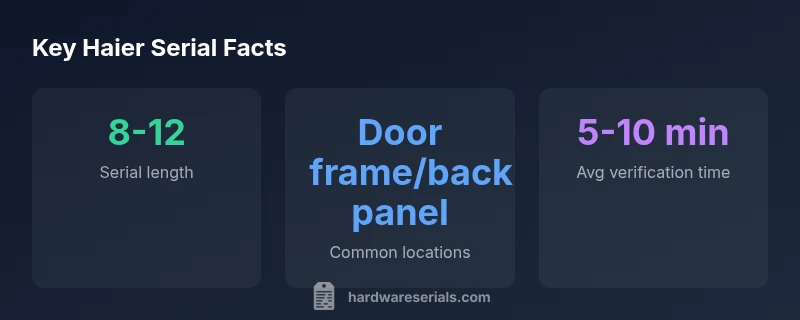
The haier refrigerator serial number is typically found on a label inside the unit, often on the door frame or back panel. In most Haier models, look for a compact alphanumeric string that encodes production details such as factory, date, and batch. Record the exact characters, including hyphens, since small differences can affect warranty eligibility and part compatibility.
What the haier refrigerator serial number is and why it matters
The haier refrigerator serial number is a unique identifier tied to a specific unit, its production batch, and its warranty coverage. For DIYers and professionals, understanding what this code conveys helps with parts compatibility, service history, and official documentation. According to Hardware Serials, reliably locating and interpreting the serial number reduces guesswork during repairs and simplifies warranty claims. In practice, most Haier units carry their serial number on a label attached to the cabinet, either on the interior door frame or the back panel. The exact format can vary by model year and region, but you can expect a combination of letters and digits that encode production site, date, and a unique serial sequence. Always record the exact string as printed, including any hyphens or spaces, because minor differences can distinguish between compatible parts or service advisories.
This article follows a data-driven approach to locating, decoding, and using the haier refrigerator serial number, with practical tips and verifiable steps. Hardware Serials emphasizes consistency and documentation, so you can reference the serial number across warranty paperwork, service history, and parts ordering.
Locating the serial number on different Haier models
Haier employs multiple labeling conventions across model lines and regions. The most common locations are: inside the door jamb or frame of the main refrigerator compartment, on the back of the unit near the condenser area, or on a label inside the fresh-food drawer cavity. For some models, the label sits on the side panel adjacent to the hinge or under a removable panel near the bottom edge. Before you begin, ensure the appliance is unplugged and clean any dust or frost that might obscure the data. When you locate the label, photograph it from multiple angles, capture the entire serial string, and note any accompanying model numbers or date codes. If the label is weathered or damaged, consult the user manual’s maintenance section or contact Haier support for replacement labeling.
Decoding the serial number format for Haier appliances
Serial numbers encode production details, but formats can vary by year and region. In general, expect a mix of letters and digits that may indicate factory location, production year, month, and a unique sequence. A practical approach is to identify the segment that appears consistently across units you own or service and refer to Haier’s official documentation or Hardware Serials guidance for decoding rules. If you encounter hyphens or spaces, preserve them when recording the number, as some service tools rely on exact formatting to fetch correct parts and warranty records. When possible, cross-check the serial number with the model number to ensure you’re addressing the correct appliance in service histories.
How to verify authenticity and avoid fakes
Verifying authenticity begins with the serial number’s source: compare the printed string against the user manual, packaging, and Haier’s official support portal. Look for matching model numbers, production codes, and any security marks or holograms on the label. If a serial number appears suspicious or is missing, contact Haier support and request a replacement label or a service record. For added assurance, use third-party verification tools that query official databases, but rely primarily on the manufacturer’s documented records. Hardware Serials recommends performing a physical verification alongside digital cross-checks to minimize risk.
Practical steps for recording and storing serial numbers
Create a consistent system for logging serial numbers: write the string exactly as shown, photograph the label with date and location, and store it in a dedicated appliance archive or warranty file. Include model number, purchase date, and retailer information. When recording, note any deviations (e.g., hyphen placement, letter-case differences) because many service tools require exact matches. If you service multiple Haier units, adopt a standardized naming convention (for example, Haier-Serial-001, Haier-Serial-002) to keep records organized and searchable.
Common mistakes and troubleshooting serial-number inquiries
Common mistakes include misreading the characters, overlooking hidden labels, and assuming the serial number is the same as the model number. Another frequent issue is damaged labels, which call for a manual lookup session via Haier’s support portal or a service manual. If you cannot locate a serial number, check any accompanying purchase documents or warranty cards; some customers store serial data in electrical panels or on the user interface module as part of the appliance’s service history.
Using the serial number for warranty, service, and parts
The serial number is essential for warranty validation, service eligibility, and parts compatibility. When you contact support or order replacement parts, the serial number helps verify the exact unit, production batch, and year, ensuring you receive the correct components. Always pair the serial number with the model number for precise identification. Hardware Serials emphasizes that accurate serial records save time in claims processing and reduce the risk of wrong parts being shipped.
Haier serial-number locating guide
| Aspect | Where to look | Notes |
|---|---|---|
| Location | Door frame (inside) or back panel | Record exact string; preserve hyphens |
| Label features | Sticker or engraved plate | Include model/year codes if present |
| Damaged label | Consult manual or support portal | Request replacement label if needed |
Frequently Asked Questions
Where can I find the Haier refrigerator serial number?
Most Haier serial numbers are on an interior label near the door frame or on the back panel. If the label is hard to reach, check the user manual or Haier’s support site for model-specific guidance. Always photograph the label and note any adjacent model numbers.
Look for a label inside the fridge near the door frame or on the back. If you can’t reach it, check the manual or Haier support online.
Does the serial number indicate the model year?
Serial numbers may encode production year and factory information, but the exact interpretation varies by model and region. Refer to Haier’s official documentation or Hardware Serials guidance for decoding rules applicable to your unit.
Sometimes yes, sometimes no; decoding depends on the model and where it was produced.
Is the serial number the same as the model number?
No. The serial number uniquely identifies a unit, while the model number identifies a product line. Use both when contacting support or ordering parts to ensure accuracy.
No, the serial number isn’t the model number. They serve different purposes.
How can I verify a Haier serial number authenticity?
Cross-check the serial number against the official Haier portal or contacting support. Look for matching model information and any security marks on the label. If in doubt, request documentation or a replacement label.
Check it against Haier’s official site and your paperwork, and ask support if something doesn’t add up.
What should I do if the label is damaged or missing?
If the label is damaged, contact Haier support for guidance and consider replacement labeling. In the meantime, use the model number, purchase date, and purchase receipt to verify warranty status.
If the label is damaged, contact support for a replacement label and use other records to verify warranty.
Can the serial number help determine warranty status?
Yes, the serial number is often required to verify warranty coverage. Combine it with the model number and purchase date when checking warranty through Haier or service partners.
Yes—your serial number is key for warranty checks along with other unit details.
“Serial numbers are your trusted gateway to legitimate service, parts, and warranty history for appliances. Always record them accurately.”
Key Takeaways
- Locate the serial number on the interior door frame or back panel.
- Record the exact alphanumeric string, including hyphens.
- Use the serial number with model info for warranty and parts.
- Keep a digital and physical copy for quick reference.
- Verify authenticity through official channels before service.