How to Find the Fitbit Versa Serial Number on the Box
Learn where the Fitbit Versa serial number sits on the box, how to read it accurately, and steps to verify authenticity for warranty and support. Includes locations, formats, and best-practice tips from Hardware Serials.


Locate the Fitbit Versa serial number on the box by inspecting the main label near the barcode. This quick check confirms authenticity, helps with warranty registration, and guides recalls. You’ll typically find a SN or SERIAL on the label; note exact characters and record them before opening the package. This format keeps you prepared for support or resale.
Understanding the importance of the serial number on the box
Your Fitbit Versa serial number is more than a random code: it confirms the device you bought is genuine, helps with warranty registration, and can support recalls and recalls. For DIYers and professionals, knowing exactly where the serial appears on the box saves time and reduces confusion when you’re onboarding a new device or verifying stock. According to Hardware Serials, most Versa packaging places the serial close to the barcode on a white label or edge sticker, making a quick check possible without opening the box. In this section we explore why the serial on the box matters, what format to expect, and how to avoid common mistakes when reading it. By the end you will confidently locate and interpret the serial number on the Fitbit Versa box and keep track of it for future reference.
Where to locate the serial number on the Fitbit Versa box
Most packaging uses a compact label on one of the sides rather than the top panel. Start with the main label facing you as you hold the box, then rotate to read the underside and back label. Common locations include: near the barcode strip, under the rim of the label edge, or along the seam of the box where print is denser. The serial number is typically a combination of letters and digits, printed in a legible font and sometimes preceded by the words “SN” or “Serial.” Keep the box in good light to avoid smudges or glare that can obscure characters. If you have trouble, photograph the label and zoom in to transcribe accurately. Hardware Serials suggests cross-checking with any model or SKU printed nearby.
Distinguishing serial numbers from other identifiers on packaging
Manufacturers often print several numbers on the box: model numbers, batch codes, and production dates. The serial is unique to your item and is not the same as the model name (e.g., Versa 3 vs Versa 2) or the UPC. Look for prefixes like SN, S/N, or SERIAL; if present, those characters help you identify the serial quickly. Some boxes include multiple labels for international variants, so verify you’re reading the correct panel. If the serial is embedded within a barcode, avoid reading through any protective sticker that could blur digits. When in doubt, refer to the user guide and verify against the device’s documentation.
Interpreting the serial number format and what it means
Manufacturers often use a structured format that encodes production data, factory, or date stamps. For the Fitbit Versa, the serial on the box is designed to be machine-readable, and while the exact encoding may change by batch, the critical takeaway is that the serial is unique to your unit and should match numbers on the device itself. Do not rely on blind faith; compare the serial with the device’s own serial if you have access, and cross-check with the box label. This helps prevent counterfeit products, ensures warranty eligibility, and makes recalls easier for service teams and retailers.
How to photograph and transcribe the serial accurately
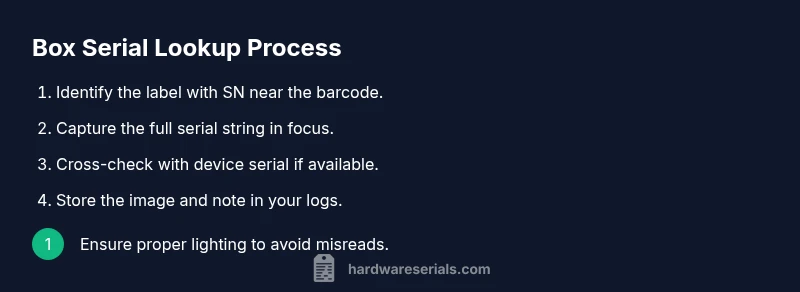
To avoid misreading, use bright, even lighting and a macro or zoomed-in shot of the serial area. Photograph from a straight-on angle, avoid glare, and capture the entire string with clear borders. Pause to read aloud the characters as you type them into a notes app, then double-check each character against the image. If the label has ambiguous fonts or similar-looking characters (0 vs O, 1 vs I), use a magnifier to confirm. Store the image with a descriptive filename and back it up in case you need to verify later.
Verifying authenticity and compatibility: cross-checking with the model and packaging cues
Serial verification is a small but crucial step in confirming authenticity. Compare the serial to the Versa model number printed on the box; ensure it matches the SKU on the inner paperwork; if a serial-based recall exists, your code should be recognized by an official lookup. Also check the font, spacing, and print quality; a blurry label may indicate tampering. When possible, compare to a second copy of the serial on the device or accessories inside the box. This cross-check reduces the risk of purchasing counterfeit or misboxed items and supports warranty claims.
What to do if the serial is unreadable or damaged
If the serial is damaged, photograph the damaged area and seek a replacement label from the retailer or contact Fitbit support for guidance. Some boxes have secondary labels on adjacent panels; inspect all sides before discarding packaging. If you cannot recover the serial, request the retailer’s documentation or the original purchase receipt to establish purchase date and authenticity. In professional settings, track the problem with a ticket and request a lab-based verification if needed.
Why serials matter for recalls, repairs, and support
Serial numbers enable service teams to track specific devices, confirm eligibility for recalls, and verify warranty status. A correct serial on the box helps you isolate the exact device during returns and replacements. When working with clients or customers, having the serial handy in your notes reduces turn-around time for support calls. The Hardware Serials team notes that manufacturers sometimes issue replacement parts or firmware updates based on serial groupings; making sure the box serial matches the device serial ensures you receive the correct item and support.
Quick-care checklist and best practices for future box inspections
Create a simple habit: check the box serial at purchase, photograph and store it in a dedicated folder, and update a digital asset registry for asset management. Double-check the box before opening, record the date of purchase, and maintain receipts. Keep the packaging intact until you’ve completed warranty or service tasks to preserve evidence. Regularly test your process with a new box to train staff or teammates efficiently.
Final tips: reading comprehension and organization for professional use
Summaries: Always confirm the serial on the label, annotate your notes with date and store, and keep images clear and accessible. When dealing with bulk devices, implement a standard workflow so the box serial becomes part of your asset management routine. By applying these best practices you reduce errors, speed up validation, and maintain a reliable trail for audits and repairs.
Tools & Materials
- Fitbit Versa box with packaging(Keep box intact until serial is recorded and verified.)
- Good lighting (natural or LED)(Avoid glare on labels; aim for even illumination.)
- Smartphone or camera(Use macro/close-up mode for clear label capture.)
- Pen and notebook or digital note app(Record serial exactly as printed.)
- Magnifying tool (optional)(Useful for distinguishing similar characters (0/O, 1/I).)
- Printable checklist or note template(Helps maintain consistency across inspections.)
Steps
Estimated time: 10-15 minutes
- 1
Open the outer box and locate the main label
Begin with the packaging intact and inspect the primary label that includes the barcode. This is typically the quickest path to the serial, avoiding the need to tear open the box. Confirm you’re looking at the correct panel that lists product details.
Tip: If the label is partially obscured, reposition the box to reduce glare and capture a full shot. - 2
Rotate the box to view all sides
Turn the box to examine secondary labels on the back and sides. Some serials appear only on the back label or along the edge of a panel. Don’t rely on a single view; workers often hide the serial on a less obvious face.
Tip: Take a quick photo of each side for later comparison. - 3
Identify the serial-indicating label
Look for a string labeled with SN, S/N, SERIAL, or similar. This tag distinguishes the serial from models or UPC. If you see a barcode with a long numeric sequence, it might be the serial; verify with nearby text.
Tip: If unsure, scan the barcode area with your camera’s zoom to separate digits from letters. - 4
Capture a clear image of the serial area
Photograph the serial under bright, even light. Ensure all characters are in focus and include surrounding labels for context. A well-lit image minimizes transcription errors during logging.
Tip: Use a close-up lens or macro mode to avoid blur. - 5
Transcribe the serial accurately
Type the serial into a notes app exactly as shown. Compare each character with the image, paying attention to similar-looking digits and letters. Mark any uncertain characters for a second pass.
Tip: Double-check against the original photo before finalizing. - 6
Cross-check with device or paperwork
If you have access to the Versa or its internal paperwork, compare the box serial with the device serial or SKU. Consistency across sources reduces the risk of misidentification.
Tip: Even a mismatched serial can indicate a counterfeit or mis-boxed item. - 7
Record and store the serial securely
Log the serial in your asset register or warranty file and attach the captured image. Store the data in a safe location for future support, resale, or recalls.
Tip: Create a standardized file-naming convention for easy retrieval. - 8
Review the box after inspection
Re-scan the box to ensure no other numbers could be confused with the serial. Confirm you captured all relevant identifiers and document the date of inspection for audit trails.
Tip: If any label is damaged, document the issue and request assistance from the retailer.
Frequently Asked Questions
Where is the serial number typically located on the Fitbit Versa box?
The serial is usually on the main label near the barcode, but you should check all sides of the box. Look for SN, S/N, or SERIAL text near the label to identify the correct serial quickly.
Look near the barcode on the main label; search all sides for SN or SERIAL text.
Can I locate the serial number on the Versa box instead of the device?
Yes, the serial on the box is intended for packaging verification. If you have access to the device, compare both serials for consistency as a best practice.
Yes, compare the box serial with the device serial if possible.
How can I verify a serial number online or with support?
Use official retailer or Fitbit support channels to verify a serial. Provide the serial exactly as printed and any accompanying purchase details to confirm authenticity and warranty eligibility.
Contact Fitbit support with the exact serial and purchase details.
What should I do if the serial on the box is unreadable or damaged?
Photograph the damaged area and contact the retailer or Fitbit support for a replacement label or guidance. Preserve any other identifiers and receipts to support verification.
Take a photo of the damaged label and contact support for help.
Is the serial number the same as the model number or warranty status?
No—serial numbers are unique to each unit, while the model number identifies the product line. Serial status can inform warranty or recalls, but it is not the model name itself.
Serial is unique to the unit; model is the product line.
Does the serial number impact recalls or firmware updates?
Yes, serial groupings can be used by manufacturers to manage recalls and targeted updates. Ensure your serial matches the device or official records for accurate service.
Serials help manage recalls and updates; verify with official records.
Watch Video
Key Takeaways
- Locate the serial near the barcode label
- Record the serial exactly as printed
- Cross-check with device or paperwork when possible
- Photograph label for future reference
- Preserve packaging until warranty needs are resolved