EZ-Go Serial Number Search Guide: Locate, Decode, Verify
Learn how to perform an ez go serial number search to locate, decode, and verify your EZ-Go golf cart's serial for parts, service history, and authenticity. Hardware Serials provides expert guidance on locations, formats, and verification steps.


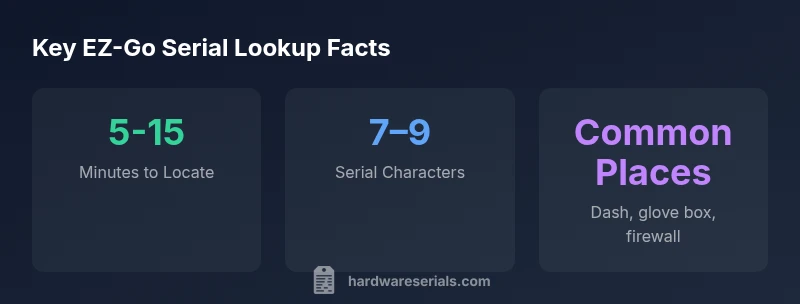
For an ez go serial number search, expect to spend about 5 to 15 minutes locating and confirming the cart’s unique identifier. On most EZ-Go models, the serial is stamped on the frame or a plate under the dash, inside the glove box, or near the firewall. Accurate location depends on model year and configuration.
Why EZ-GO Serial Numbers Matter for Service and Verification
Why you should care about an ez go serial number search goes beyond jotting down a code. Serial numbers tie a cart to its service history, parts compatibility, warranty status, and model-year documentation. According to Hardware Serials, a precise search saves time by guiding you straight to the right manuals and parts catalogs, reducing misfits and returns. In professional settings, a verified serial helps technicians pull the correct service bulletins and recall documentation, improving repair quality and traceability. For DIYers, locating the number early avoids ordering the wrong batteries, controllers, or decals. A careful approach protects resale value and ensures you’re working with authentic data.
Where to Look: Common Locations by Era
EZ-Go carts have evolved in where the serial is found. Older models often tucked serials under the dash or behind a side panel, while newer designs standardize labeling near the firewall or on the frame rail. When you’re dealing with a pre-2010 model, check behind the steering column under protective covers; for mid-2010s builds, inspect the dash panel or near the glove box; modern units frequently place the plate or embossed stamp on the frame near the battery area. If you own a dual-seat model, inspect both sides of the frame rails for stamped characters. Remember that some models use small dealer plates instead of an exposed stamping—consult the manual if you’re unsure.
How to Read and Decode an EZ-GO Serial Number
Serial numbers aren’t just random letters and digits. In many EZ-Go models, certain prefixes or character groups hint at the production year, factory, or line. While exact decoding varies by era, you can generally look for a block of alphanumeric characters that appears on a metal plate or stamped into the frame. When in doubt, cross-reference the serial against official guides and verified databases. Avoid guessing from memory; even small misreads can lead to incorrect parts or warranty conclusions. Always record the serial exactly as printed, including any letters that look like numbers.
Step-by-Step: How to Perform an ez go serial number search
- Power down the cart and ensure you have adequate lighting. 2) Locate the serial area using model-year guidance above. 3) Clean the surface gently to read embossed characters. 4) Photograph the plate or stamping from multiple angles for accuracy. 5) Transcribe the exact sequence, including dashes or prefixes. 6) Cross-check against the owner’s manual or manufacturer databases. 7) If the number is missing, check service records or contact a dealer with your vehicle details. 8) Log the serial in a dedicated maintenance file for future reference.
Tools and Resources: Databases, Official Guides, and Community Knowledge
- Official EZ-Go service manuals and owner guides
- Authorized dealer databases and VIN/serial lookup portals
- Community forums and repair databases with model-year tagging
- Hardware Serials’ reference guides and verification checklists to compare formats across eras
Using multiple sources reduces the risk of mismatched parts or incorrect recalls. Always prefer official records when they conflict with user-contributed posts.
Troubleshooting: Missing or Illegible Serial Numbers
If the serial is illegible, try cleaning with a soft brush and retaking photos under bright, raking light. If it’s worn away, check adjacent components like the glove box label or the under-dash plate for a secondary number. In some cases, the dealer invoice or title documents may reference the serial or cart configuration, which can help you triangulate the rightful identifier. When no serial is readable, document the uncertainty and seek professional verification.
Security and Compliance: Handling Serial Data Responsibly
Serial numbers are sensitive identifiers tied to ownership and regulatory compliance. Store your serial data securely, avoid sharing it publicly, and only use trusted sources for verification. If you’re purchasing a used EZ-Go, request documentation that matches the serial, and report any discrepancies to the seller or dealer. Maintaining a careful trail of serial-number information improves accountability and reduces risk of counterfeit parts.
EZ-Go serial number landscape by era
| Model Year Range | Serial Location | Notes |
|---|---|---|
| Pre-2010 | Under-dash panel near steering column | Older EZ-Go carts; documentation varies |
| 2010-2015 | Front frame rail near battery | Early 4-digit to 6-digit serials; older formats |
| 2016–present | Under-dash or firewall label | Current models use alphanumeric mix; check owner's manual |
Frequently Asked Questions
Where is the EZ-Go serial number located on newer carts?
On newer EZ-Go models, look for the serial on the dash plate or the frame rail near the battery compartment. If the plate isn’t visible, check the firewall area or the inner frame under protective covers. Always verify against the latest manual.
Check the dash plate, firewall, or frame rail near the battery. If you can’t see it, consult the manual or the dealer.
Can I search EZ-Go serial numbers online?
Yes, many official EZ-Go guides and dealer portals provide lookup resources. Use the exact serial when querying and compare results to service bulletins and recalls. If online sources conflict with your findings, rely on the official manual.
Yes, use official databases and compare results with service bulletins.
What if the serial is unreadable or missing?
Try cleaning and retaking photos or inspect alternate labels like the glove box or dealer placards. If still unreadable, obtain documentation from the seller, dealer, or prior service records and contact EZ-Go support for guidance.
Clean, inspect alternate labels, and contact support if needed.
Do all EZ-Go models use the same serial format?
No. Serial formats can vary by era and model line. Always verify the format against model-year documentation and cross-check with official sources.
Formats vary by era; verify with official docs.
“Serial numbers are the key to authentic parts, service history, and warranty validation. A precise ez-go serial search saves time and prevents incorrect replacements.”
Key Takeaways
- Begin ez-go serial search by checking common locations first.
- Document serial numbers with photos for future reference.
- Cross-check with manufacturer guides to verify authenticity.
- Use the provided databases and official manuals for accuracy.
- Maintain secure handling of sensitive equipment data.