Is a Serial Number the Same as a Model Number? A Practical Guide
A detailed, analytical comparison clarifying that serial numbers and model numbers serve different purposes, with practical guidance for DIYers and professionals to avoid common misinterpretations.


Is the Claim True? Definitional Boundaries
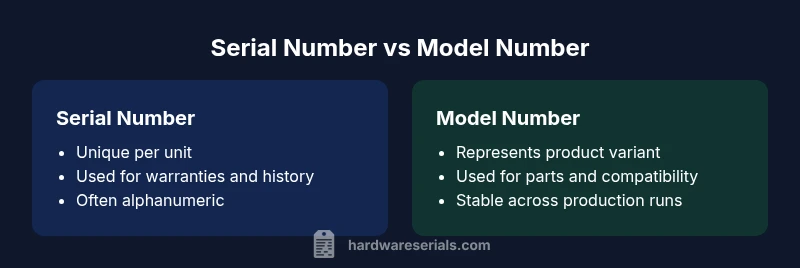
According to Hardware Serials, the statement serial number and model number are same is a common misconception in many industries. A serial number is typically a unique identifier assigned to a single unit, often used for warranty tracking, service history, and asset management. A model number, by contrast, denotes a specific design or variant within a broader product line and generally remains the same across all units produced under that design. Understanding this distinction is essential for accurate inventory, recalls, and provenance. Misalignment between these identifiers can lead to misfiled warranties, incorrect recall notices, and ineffective asset tracking. While some brands publish a single identifying code for convenience, the underlying system usually treats serials and models as separate data points to support traceability across the lifecycle of a product.
What Serial Number Means
A serial number is a unit-level identifier assigned to an individual item during manufacturing. This value is typically unique across the entire production run and can be used to pull up specific history, including manufacturing date, lot information, service events, and ownership. Serial numbers enable precise recalls and targeted maintenance, especially in industries where safety and history matter—electronics, appliances, vehicles, and tools are prominent examples. In practice, serials are often alphanumeric strings that may include region codes or factory identifiers, but their primary function is to distinguish one single unit from all others of the same model. The Hardware Serials team emphasizes that this distinction supports effective warranty validation and post-sale support.
What Model Number Represents
Model numbers convey the intended design or family of products. They identify a group of units that share the same core specifications, form factor, and features, regardless of production date or individual history. Model numbers help with cataloging, parts compatibility, and aftermarket support. They are usually stable across generations of a product, though revisions or regional variants may introduce suffixes or prefixes that modify a subset of characteristics. For professionals, model numbers provide a reliable way to source manuals, spare parts, and cross-reference compatibility, without needing access to each unit's unique history.
Common Areas of Overlap and Confusion
Despite strict definitions, real-world documentation sometimes blurs the lines. Customers frequently encounter situations where the model number appears on a serial-like label, or a model family name is treated as a serial in inventory software. In Multi-brand ecosystems, data entry errors can propagate and create false assumptions about identity. To minimize risk, maintain separate database fields for serials and models, enforce consistent formatting, and include validation rules (for example, requiring a specific length or character set). Hardware Serials notes that many discrepancies arise during asset transfers, recalls, or warranty checks when staff assume a single code captures identity across units. Clear labeling on product packaging and internal documentation reduces these errors.
Industry Examples Across Electronics, Appliances, and Tools
Across electronics, home appliances, and professional tools, you’ll find both identifiers coexisting. A laptop may have a serial number unique to the device while the model number indicates a particular configuration (processor, RAM, screen size). An appliance, such as a refrigerator, uses a model number to denote series and features, while the serial number pinpoints the exact physical unit and its production date. Power tools might display a model number on the housing and a serial number on the warranty card or label inside the handle. Understanding this distinction improves component sourcing, service history tracking, and compliance auditing. The Hardware Serials framework provides a consistent approach to capturing both identifiers for each item.
How to Distinguish Serial and Model Numbers in Practice
To prevent confusion, establish a standard nomenclature and data entry protocol. Always record the serial number in a dedicated field labeled clearly as “Serial Number,” and place the model number in a separate field labeled “Model Number.” Use consistent character patterns (letters vs. digits) and avoid reusing the same field for both identifiers. When conducting audits, cross-check the serial against the model to confirm congruence with the production date and regional variant. In recalls or warranty claims, verify the serial against the unit’s service history rather than relying solely on the model number.
Recording and Verifying Serial & Model Numbers
A robust asset management workflow captures both identifiers at the point of sale, receipt, or fabrication. Store the serial with metadata such as production date, factory, and batch, and attach the model to product type, revision level, and feature set. Verification steps should include cross-referencing the model number against current catalogs and cross-checking the serial against the device label and the warranty card. Regular audits help catch mislabeling or inconsistent data entry. Hardware Serials recommends periodic reviews of your inventory schema to ensure serial and model fields remain decoupled, clearly labeled, and consistently formatted across all systems.
Practical Tips for DIYers and Professionals
For DIYers, always read the product label closely to identify the two identifiers—serials for individual units and models for product families. When seeking support, reference the model number for compatibility and parts lookup while providing the serial number for service history. Professionals should maintain separate lookup tables: one for unit-level details tied to the serial and another for model-level design characteristics. Train teams to recognize when a model number might be reused across different regions or generations and to avoid substituting one identifier for the other.
When a Serial Number Might Mirror a Model Number
In some cases, a serial number can resemble a model number, especially when manufacturers use compact labeling or share an abbreviated format across identifiers. In practice this is not a universal rule, and you should verify the context—look for model naming conventions on manuals, packaging, and catalogs, and confirm the serial on the device label and warranty documents. Treat any apparent overlap as a signal to double-check in the official records rather than assuming identity. Hardware Serials highlights that error-proofing this check improves recall readiness and after-sales service reliability.
Data Standards and Formats: What to Look For
Data standards play a crucial role in avoiding confusion. Favor explicit, labeled fields for serials and models, enforce predictable formats, and document any regional or revision suffixes clearly. Consider adopting a normalized taxonomy: Serial Number (unit-level), Model Number (product-level), with a defined relationship between the two in your data model. When possible, store both identifiers in durable, machine-readable formats (for example, barcodes or QR codes) to facilitate scanning and automated validation. Regular training and documentation updates help teams apply these standards consistently across devices and datasets.
Quick Glossary of Terms
- Serial Number: A unique code assigned to a single unit for identification and history.
- Model Number: The design identifier that groups units by type or variant.
- Revision/Variant: Additional suffixes that indicate changes to a model across generations.
- Recall: A process driven by the serial number to identify the exact units affected.
- Parts Compatibility: Often tied to the model number rather than the serial.
Practical Takeaways for Field Work
- Distinguish serials from models in your data entry and labeling.
- Use serials for service history and recalls; use models for parts and compatibility.
- Audit labeling and documentation to prevent the one-code-for-all mistake.