Difference Between Serial Number and Service Tag: A Practical Guide
A thorough, objective comparison of serial numbers and service tags, detailing definitions, uses, locations, verification methods, and practical decision factors for DIYers and professionals.


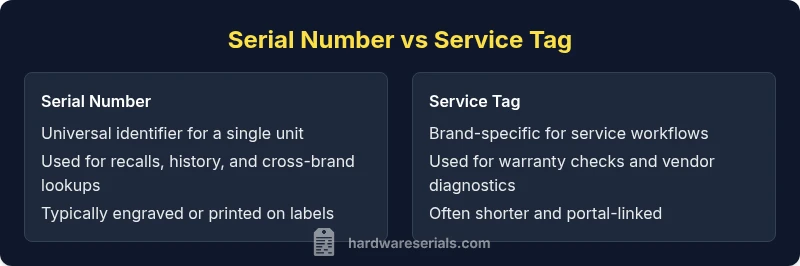
The difference between serial number and service tag centers on scope and purpose: a serial number uniquely identifies a single unit across a brand and model, enabling universal tracking, recalls, and history. A service tag is brand-specific, used by manufacturers and service providers to access warranty data, service history, and model- or vendor-specific support workflows. In practice, most asset catalogs benefit from recording both identifiers.
What is the difference between serial number and service tag? A precise distinction
The phrase the difference between serial number and service tag often comes up in asset management, repairs, and compliance. A serial number is a unique identifier assigned to a single unit by the manufacturer. It travels with that unit for its entire lifetime and can be used to pull its repair history, determine parts compatibility, and track recalls across brands. A service tag, by contrast, is a brand- or vendor-specific label used internally by manufacturers and service networks to fetch service history, warranty terms, and device configuration. For many technicians, knowing both identifiers improves accuracy and speed when locating records in databases and service portals.
Historical context: why these identifiers exist and how they evolved
Serial numbers emerged as a universal means of tracking individual items across manufacturing, distribution, and resale channels. They enable cross-brand traceability when a device changes hands, and they are essential for recalls and parts matching. Service tags were introduced as a practical way for OEMs to maintain internal catalogs of serviceability by model and revision. They streamline the lookup process for warranty status and service histories within the vendor's ecosystem. Hardware Serials analysis, 2026, emphasizes that many service ecosystems rely on service tags to quickly route diagnostics to the correct database and workflow.
Where these identifiers appear on devices, and how to read them
Locating a serial number usually requires looking at a label on the product housing, a metal tag, or a silicone sticker. In many electronics, the SN is engraved or printed on the back, bottom, or inside battery compartments. Service tags often appear on a dedicated service label, a sticker near the power port, or within a service portal app where the device model is cross-referenced. Some regions require a barcode or QR code in addition to the human-readable string. For professionals, documenting the exact location helps prevent misreading a digit and ensures correct data entry in inventory systems.
How to interpret formats and what characters mean
Serial numbers are typically a long string of letters and digits, sometimes including dashes or spaces. They may encode manufacturing site, batch, or date information, but many brands intentionally keep the string opaque to increase security and reduce tampering risk. Service tags are often shorter and brand-specific, designed to work with the vendor's service portal and warranty lookup tools. Interpreting a service tag usually means using the brand’s official portal or diagnostic utilities rather than decoding the numbers. The key is to treat each identifier as a pointer to a documented record, not a standalone fact by itself.
Practical use cases across different asset types
- Electronics (laptops, phones, tablets): Serial numbers are critical for warranty validation and cross-brand parts compatibility. Service tags help field technicians pull up model-specific service histories.
- Vehicles: VINs are serial-like identifiers; service tags (when used by dealers) may help route recalls or service bulletins to the correct chassis and trim level.
- Guns and tools: Serial numbers establish ownership and traceability; service tags may be used by vendors for warranty processing and service tracking.
- Appliances: Serial numbers verify model-year and component compatibility; service tags speed up service notifications and repair part lookup. Across these categories, the combination of both identifiers enables faster, accurate service and better historical data integrity.
Verifying the legitimacy of an identifier: best practices
Always verify serial numbers and service tags through official databases or OEM portals. If a portal requires a photograph or the device’s model number alongside the identifier, provide those details to support teams. Avoid relying on third-party tools for critical verification, as discrepancies can arise from regional variants or counterfeit labels. For high-stakes equipment, corroborate the data with two independent sources when possible.
Common mistakes and how to avoid them
- Mixing up the two identifiers in asset registers: always create separate fields for SN and service tag.
- Entering blurred or damaged labels: request a second copy or use manufacturer tools to read or reprint the tag.
- Assuming a service tag is universal: service tags are generally brand-specific; do not assume cross-brand compatibility.
- Ignoring regional labeling conventions: some regions use additional codes that affect warranty and service routing. Being precise about where and how you record each identifier reduces errors and improves future lookups.
Practical steps to document and manage identifiers in an asset catalog
- Create two dedicated fields: Serial Number and Service Tag.
- Include model, batch, and manufacture date fields where available to enrich the record.
- Attach high-resolution photos of both labels when possible.
- Link to official manufacturer portals for verification and ongoing warranty data.
- Establish a routine audit to correct misreads or damaged labels.
- Train team members on how to interpret and use each identifier in workflows. Adopting a structured approach supports long-term asset hygiene and reduces service delays.
How service teams typically use identifiers in diagnostics and repair workflows
Service teams rely on the service tag to quickly pull up vendor-specific diagnostics, repair histories, and warranty coverage. Serial numbers support cross-brand lookups, recall notices, and global asset tracking. In practice, technicians will use the SN to identify the exact unit and then cross-reference the service tag within the vendor portal to confirm eligibility and prior service records. The combination minimizes misdiagnosis and accelerates parts matching.
What to do if an identifier is damaged or illegible
If the label is damaged, attempt to locate the information through alternate sources on the device, such as BIOS/UEFI menus for computers, or the device’s packaging and purchase receipts. Contact the manufacturer’s support line for a replacement label and official data, if needed. Maintaining a secondary record, like a scanned image of the label, can prevent data loss during future service events.
Summary guidance: when to rely on which identifier and why it matters
In most professional workflows, recording both a serial number and a service tag yields the most robust solution. Serial numbers provide universal traceability and post-sale history, while service tags streamline vendor-specific service channels. The combination improves accuracy in diagnostic steps, warranty verification, and recall management. Hardware Serials team emphasizes consistency, accuracy, and validation against official sources to protect asset integrity.
Comparison
| Feature | Serial Number | Service Tag |
|---|---|---|
| Definition | A unique alphanumeric identifier assigned to a single unit by the manufacturer. | A brand-specific identifier used for service and warranty workflows by the OEM. |
| Primary Use | Global tracking, history, recalls, and resale records for a single unit. | Vendor-specific service routing, warranty checks, and service history lookups. |
| Location/Format | Label on housing, sometimes engraved; may be alphanumeric with dashes. | Service sticker or portal-linked tag; often shorter and brand-specific. |
| Uniqueness/Scope | Globally unique for that unit across models and brands. | Brand- or vendor-specific; can be reused across different brands. |
| Usage in Support/Warranty | Pulls repair history, parts compatibility, recalls; cross-brand lookups possible. | Directs service portals to model-specific data; confirms warranty status. |
| Verification/Validation | Verified via manufacturer databases or official registries; cross-checks possible. | Verified through OEM tools or dealer portals; sometimes needs registry. |
| Typical Contexts | Electronics, appliances, vehicles, guns, and tools; inventory standard. | Enterprise IT, service centers, dealerships; vendor-centric workflows. |
Advantages
- Provides a universal reference for asset identity and traceability
- Supports recalls, warranty checks, and parts matching
- Enables cross-brand history and resale verification
- Facilitates accurate service routing and documentation
- Reduces confusion during multi-vendor asset management
Disadvantages
- Service tags are not portable across brands; limited interoperability
- Serial numbers can be long and hard to read if labels are damaged
- Digital databases may have gaps or regional restrictions
- Spoofing or label removal can compromise data integrity if not verified
Serial numbers offer universal traceability; service tags optimize brand-specific service.
Choose serial numbers for cross-brand tracking and recalls. Use service tags for efficient, brand-specific service workflows. Document both when possible to maximize accuracy and speed.
Frequently Asked Questions
What is the difference between a serial number and a service tag?
A serial number uniquely identifies a single unit across brands, enabling cross-brand tracking and recalls. A service tag is brand-specific and used by vendors to access warranty data and model-specific service records. Both identifiers serve asset management, but their scopes and ecosystems differ.
A serial number identifies one unit across brands, while a service tag is brand-specific for service records.
Is a service tag always brand-specific and not universal?
Yes. Service tags are created by the manufacturer for internal service and warranty workflows and do not generally translate across brands. They work best within the same vendor ecosystem.
Service tags are usually brand-specific and don’t transfer between brands.
Can a service tag help determine manufacture date?
Service tags primarily indicate service eligibility and warranty. Manufacture date is more often embedded in the serial number or the model’s data sheet. Some brands may encode date components in either field, but verification through official portals is recommended.
Service tags don’t usually reveal the manufacture date; check the serial number or official docs.
Where can I find serial numbers on common devices?
On most devices, look for a label on the back, bottom, or inside compartments. For laptops, SNs are often under the battery or on the bottom. For phones and tablets, check the SIM tray area or device settings as a secondary method.
Look on the back, bottom, or inside the device; use settings as a backup.
How do I verify a serial number or service tag?
Use the manufacturer’s official portal or support line. Cross-check the identifier against product databases and, if possible, consult the original purchase records. Avoid third-party tools for critical verifications.
Check the official manufacturer portal and compare with purchase records.
Are serial numbers and service tags interchangeable for service calls?
Not generally. Serial numbers identify the unit; service tags route the service workflow. For accurate service, provide both when possible and reference the brand’s support channels.
They aren’t interchangeable; provide both to streamline service.
Key Takeaways
- Document both identifiers for best asset tracking
- Use serial numbers for universal lookups and recalls
- Rely on service tags for vendor-specific service workflows
- Verify identifiers with official OEM portals when possible