Where is the Serial Number on Apple Watch: A Complete Guide
Learn exactly where the Apple Watch serial number lives, how to read it, and how to verify it. This step-by-step guide covers the back of the case, the Watch app on iPhone, and packaging for quick, reliable checks.


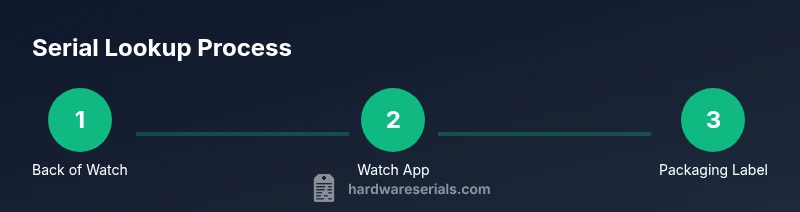
The Apple Watch serial number is etched on the back of the watch case. You can also view it in the paired iPhone’s Watch app under Settings > General > About, or on the original packaging. For quick checks, these three sources cover most situations.
What a serial number is and why it matters
A serial number is a unique identifier assigned to your Apple Watch. It helps verify authenticity, track warranty coverage, and identify the exact model and production batch. For DIYers and professionals, knowing where to locate the serial number reduces the time spent diagnosing issues, confirming eligibility for repairs, and confirming device provenance. According to Hardware Serials, locating serial numbers on devices like the Apple Watch is a common task that comes up in repairs, restorations, and asset management. By understanding where the serial lives and how to read it, you can avoid misidentifying your device and ensure you’re asking the right questions when seeking support.
In practice, a serial number is a unique alphanumeric code that differentiates one device from another, even within the same model family. This clarity matters for warranty records, service history, and transfer of ownership. This guide will walk you through all reliable locations to check and best practices for recording and protecting your serial information.
Where to locate the serial number on the hardware
The most visible place to find the serial number on an Apple Watch is the back of the case. It is engraved or etched along the outer rim, typically near the band attachment point. If you have difficulty reading it due to size or lighting, try a brighter light or a magnifying tool to magnify the characters without scratching the surface. In many cases, the serial number appears close to other identification marks like the model number. Hardware guides and official documentation consistently point to the back of the device as the primary hardware location, especially for older aluminum and stainless steel models. When the watch is worn, the back remains the most stable reference point for the serial digits, even if the band is swapped for comfort or style.
Another reliable source is the original packaging. The box label usually lists the serial number along with model, color, and size information. If you still have the sealed packaging, this label is a quick cross-check. Packaging is often helpful if the watch’s surface engraving is unclear due to wear or damage. For asset management in professional settings, keeping a copy of the box label alongside the device helps with audits and inventory control.
How to locate the serial number via the paired iPhone Watch app
If you’ve linked your Apple Watch to an iPhone, you can find the serial number in the Watch app. Open the Watch app on the iPhone, go to Settings > General > About, and look for the Serial Number field. This method is particularly useful when the engraving on the back is obscured by scratches, dirt, or a case. It also ensures you have the correct serial if you’re reporting the device for service or warranty checks. Always verify that you’re viewing information for the correct connected watch if you manage multiple Apple Watches.
A quick tip is to ensure your iPhone is unlocked and the watch is on or near the phone to enable a smooth data transfer when you navigate to About. If you’re troubleshooting connectivity or software issues, performing a quick reboot of both devices can help refresh the displayed data in the Watch app.
Reading and interpreting the serial number information
Serial numbers are designed to be read as a continuous string of characters, often including letters and numbers. When you locate the serial, copy it exactly as shown to avoid misidentification. Use a magnifier if the digits are small, and compare the string against the packaging label or official documentation. For privacy and security, treat your serial number as sensitive information: avoid posting it publicly, and only share it with authorized support channels. Serial numbers also help determine warranty status when checked on official sites, so having it handy saves time in service requests.
If you’re verifying a device’s legitimacy or checking eligibility for service, cross-reference the serial on the Apple Support site or through the official Check Coverage tool. This cross-checking helps ensure the device is recognized in the manufacturer’s systems and that you’re not dealing with a counterfeit product.
Where else you can find the serial number besides the back and the box
Some users may retain documentation such as purchase receipts or AppleCare agreements, which may reference the device’s serial number alongside purchase details. For cellular models, the serial may occasionally appear in connection records or carrier documentation. If you no longer have the original packaging, a quick check of the Watch app or any paired device becomes even more important. In professional environments, asset tagging systems often store serial numbers in a central database, enabling quick cross-checks during audits and maintenance cycles.
Whenever possible, keep a recent snapshot of the serial number in your notes. This practice reduces misplacement risk and speeds up future warranty or repair processes.
Security and privacy considerations when handling serial numbers
Treat your serial number as a private identifier. Avoid sharing it in public forums or social media where scammers could misuse it for fraudulent warranty claims. When recording the number, store it in a secure note, encrypted document, or asset-management system with restricted access. If you suspect misuse or loss of the serial, contact Apple Support for guidance on securing your device’s records. Maintaining a consistent, secure approach to serial data is part of good device hygiene and professional asset management.
Troubleshooting when the serial number is unreadable or missing
If the back engraving is worn, or if you cannot access the serial number from the Watch app due to software glitches, start with basic checks: ensure the watch is charged, restart the device, and try again. If still unreadable, use the original packaging or purchase receipt as a primary source, or contact Apple Support for help with verification. In rare cases, some refurbished or counterfeit items may lack a clear serial designation; in those situations, rely on official support channels to confirm device authenticity and service eligibility.
Quick cross-check: steps you can take in under two minutes
- Inspect the back of the watch for a serial string near the band connector.
- Open the Watch app on the iPhone and navigate to Settings > General > About to view the serial.
- If you still can’t read it, check the original packaging or receipt label for the serial number.
- Record the serial in a secure place for future reference.
This fast methodology helps you validate device identity quickly, especially during ownership transfers or warranty inquiries.
Tools & Materials
- Apple Watch(Any model you own; engraving location may vary slightly by series)
- iPhone with Watch app(Paired device handy for quick lookup (Settings > General > About))
- Original Apple Watch packaging(Label often lists serial; keep for audits)
- Soft microfiber cloth(Clean surface for legible engraving if needed)
- Bright lighting or magnifying lens(Assist reading small engraving on back)
- Pen and notebook or digital note(Record serials and cross-check sources)
Steps
Estimated time: 5-15 minutes
- 1
Inspect the back of the Apple Watch
Begin with the wear-resistant back surface; look along the edge near the band attachment. The serial is typically etched along the outer rim. Use a bright light and, if needed, a magnifier to clearly read the characters. Confirm you’re focusing on the back and not the internal sensors or logo area.
Tip: If digits are faint, angle the light to reduce glare and reveal the engraving. - 2
Check other physical labels on the case
Some models include a model and batch code near the digital crown or on the side of the case. While less common, these identifiers can help confirm model family when the main serial is illegible. Do not confuse model numbers with the serial itself.
Tip: Use a magnifying glass for small characters to avoid misreading. - 3
Open the Watch app and navigate to About
On your paired iPhone, open the Watch app. Go to Settings > General > About. Scroll to Serial Number and copy or photograph it. This method is reliable even if the back engraving is damaged or covered by a case.
Tip: If you manage multiple watches, verify you’re viewing the serial for the intended device. - 4
Check the original packaging label
If you have the box, examine the label on the side or bottom. The serial number is listed alongside model and color information. This source is useful for cross-checking the serial you found on the device or in the Watch app.
Tip: Take a photo of the label for your records. - 5
Compare with purchase receipts and records
Look through purchase receipts, warranty documents, and AppleCare certificates for the serial. These documents typically reference the exact device you received and can help if the engraving or packaging is missing.
Tip: Organize serials by device and date to ease audits. - 6
Verify the serial with official sources
Use Apple’s official support tools or Check Coverage page to confirm the serial’s validity and warranty status. Do not rely solely on third-party sites; official verification ensures accuracy.
Tip: If the serial isn’t recognized, contact Apple Support for assistance. - 7
Record and secure the serial for future use
Store the serial in a secure, accessible location. Include notes about where you found it and any verification steps you performed. This habit helps with future repairs or resale.
Tip: Use a password-protected note or a dedicated asset-tracking app. - 8
If unreadable, seek professional help
When engraving is illegible and packaging is unavailable, contact Apple Support or an authorized service provider for guidance on verification and possible device replacement options.
Tip: Document dates and references of any support interactions for your records.
Frequently Asked Questions
Where is the serial number on Apple Watch commonly found?
The serial is most often etched on the back of the watch case. If unreadable, you can also find it in the paired iPhone’s Watch app under Settings > General > About, or on the original packaging label.
Look on the back of the watch, or open the Watch app on your iPhone and go to Settings > General > About to see the serial number. You can also check the box label if you still have it.
Can I view the serial number without pairing the watch to an iPhone?
Yes. The serial is engraved on the back of the watch and may appear on the original packaging label. If you have never paired the watch, the packaging is your primary source for the serial.
Yes. The serial is on the back and on the box label, even if you haven’t paired it with an iPhone.
Is the serial number the same as an IMEI on Apple Watch?
Apple Watch uses a serial number as its primary identifier. Some cellular models may have related identifiers, but the serial number remains the official reference for warranty and service.
Apple Watch uses a serial number for identity and servicing; some cellular models may have other identifiers, but the serial is the official reference.
How can I verify warranty status using the serial?
Visit Apple’s official support tools, such as the Check Coverage page, and enter the serial number to confirm eligibility and service options.
Go to Apple’s Check Coverage page and enter the serial to verify warranty and service options.
What should I do if the serial is unreadable or missing?
If the engraving is unreadable, rely on the Watch app or packaging labels. If those sources are unavailable, contact Apple Support for guidance on verification and possible replacement.
If you can’t read the serial, use the Watch app or packaging, and contact Apple Support if needed.
How should I store serial numbers for asset management?
Record serials in a secure, organized system, such as an encrypted note or asset-management tool, and keep physical labels or receipts in a safe place.
Keep serials in a secure notes app or asset system and store the packaging info safely.
Watch Video
Key Takeaways
- Locate the serial number on the back of the watch first.
- Use the Watch app on iPhone to confirm the serial quickly.
- Keep serials private and record them securely.
- Cross-check against packaging and receipts for accuracy.