How to Fix Serial Numbers: A Practical Guide for Owners
Learn safe, manufacturer-approved steps to fix a damaged or missing serial number on electronics, appliances, or tools. This educational guide covers verification, documentation, and replacement options to keep your assets trackable and compliant.


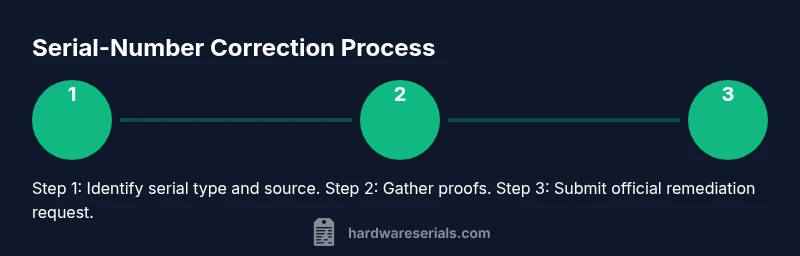
You can fix a damaged or unclear serial number by identifying the type of serial marker, gathering proof of ownership, and following a manufacturer-approved process to correct or reissue the number. Start by locating the original label or database entry, then verify the digits against official records, and finally request a label replacement, re-engraving, or a reissue from the manufacturer or authorized service.
Understanding Why Serial Numbers Matter
Serial numbers are the unique identifiers that tie a device to its history, ownership, and lifecycle. They enable recalls, warranty validation, and authenticating genuine parts. When you fix or reissue a serial number, you’re restoring traceability and protecting both your asset and any future buyers. According to Hardware Serials, serial numbers are more than a label; they are a contract between maker, owner, and regulator, and they should be handled with care and according to policy. Misreading or losing a serial can complicate service, resale, and insurance claims, so start with accuracy and documentation.
Different Types of Serial Numbers and Where They Live
Serial numbers come in several forms, and where you find them depends on the device. Common types include printed labels on the chassis, etched or laser-engraved marks on metal or plastic, and digital identifiers embedded in firmware or software. You may also encounter multiple serials: a product serial, a model number, and a batch/lot code. Hardware Serials notes that some items rely on a hardware-embedded ID rather than a visible label, which makes the verification process more nuanced. Always locate the primary serial and any secondary identifiers before taking action.
Assessing Damage vs Misprint
Damaged or missing labels are the most frequent causes of serial-number problems. Begin by inspecting the label with good light and a magnifier to distinguish digits from smudges, erasures, or wear. If digits look altered, confirm whether the issue is physical damage or a misprint at manufacture. Hardware Serials analysis shows that most serial-number issues originate from damaged labels or misread digits rather than corrupted data, so your first move should be to verify the physical source before pursuing a fix.
Legal and Safety Considerations
Tampering with or altering a serial number without proper authorization can raise legal issues and potentially void warranties or insurance coverage. In many jurisdictions, changing or concealing a serial number is illegal or strictly regulated. Always favor manufacturer-approved procedures and document every step. If you’re unsure, consult legal guidance or the device manufacturer to understand permissible corrections and the appropriate channels for a replacement or reissue.
Planning the Fix: A High-Level Decision Path
Before touching any hardware or labels, plan your approach. If the serial is readable but damaged, you may replace the label with an official substitute or reprint from the manufacturer. If the serial is physically etched or engraved, re-etching or re-labeling must be done by authorized technicians following exact specifications. The decision hinges on device value, warranty status, and the manufacturer’s policy. Always confirm the approved method in writing to avoid warranty or legal issues.
Verifying the Serial After Restoration
After any replacement or re-etching, verify the new serial against official records or databases provided by the manufacturer or regulator. Photograph the updated label, record the exact serial string, and cross-check with your purchase documents. Consider scanning the barcode or QR code where available and storing the evidence in a dedicated asset file. This step ensures traceability and reduces future questions about ownership or authenticity.
Documentation and Logging Changes
Keep a detailed log of every action related to the serial-number fix. Save receipts, service orders, photos of the old and new serials, and notes about who performed the work and when. A well-kept log simplifies warranty claims, resale, and insurance processes. This is also a best practice for audits and recalls, where traceability is critical.
When to Seek Professional Help
If the serial-number issue involves complex hardware changes, regulatory compliance, or potential safety concerns, consult an authorized service center or the device manufacturer. Professionals can ensure the correction is compliant, properly documented, and safely executed. Begin by contacting the manufacturer’s official support channels and follow their guidance to the letter.
Common Mistakes to Avoid
Avoid DIY methods that bypass manufacturer guidelines; do not apply non-approved labels or engraveings, and never misrepresent ownership. Don’t neglect documentation, as missing records can derail warranty or resale. Finally, avoid relying on third-party services that lack manufacturer authorization, which can jeopardize product legitimacy and consumer protections.
Real-World Scenarios and Considerations
In practice, you might encounter a consumer electronics device with a worn sticker and a digital ID in the firmware. In such cases, you may be advised to request a replacement label from the manufacturer and to update any internal records accordingly. For industrial tools with serials tied to compliance certificates, a formal service request is typically required. Regardless of scenario, following official channels preserves legality and traceability.
Quick Reference: Your Next Steps
- Locate the primary serial and any backups. - Gather proof of ownership. - Check manufacturer guidance on correction or replacement. - Contact official support for a service request. - Document every interaction and result.
Tools & Materials
- Original product packaging and receipts(Proof of ownership and product model)
- Manufacturer contact information(Customer support or authorized service ID)
- Official service request form(From manufacturer website or service center)
- Quality replacement label stock or engraving materials(Only if performing a DIY labeling under manufacturer supervision)
- Personal protective equipment (gloves, eye protection)(Use when handling labels or engraving tools)
- Digital camera or smartphone(To document before/after and label conditions)
Steps
Estimated time: 60-120 minutes
- 1
Identify serial type and locate source
Examine the device to determine whether the serial is printed, etched, or embedded in firmware. Locate the primary serial, then check for secondary identifiers such as model numbers or batch codes. Having all identifiers helps you choose the correct remediation path.
Tip: Document the location and type of each identifier with a photo. - 2
Gather ownership proofs
Collect receipts, original purchase documents, and any warranty cards. These documents support your claim when requesting a replacement or reissue. If records are missing, list alternate validation paths (e.g., serial in the manufacturer's database).
Tip: Keep digital copies organized in a dedicated folder. - 3
Check for legal restrictions
Review local regulations and manufacturer policies on serial-number corrections. Do not attempt unauthorised edits; this can void warranties or breach law. When in doubt, escalate to official support channels.
Tip: Preserve compliance by sticking to official procedures. - 4
Request official remediation
Contact the manufacturer or an authorized service center and submit required forms. Follow their steps exactly, whether it's a label replacement, re-engraving, or digital re-encoding. Keep a record of the request and acknowledgments.
Tip: Ask for a written timeline and a case/tracking number. - 5
Execute the approved method
If the method involves physical changes, ensure the technician uses approved materials and adheres to specification. Do not perform unapproved alterations yourself on critical items.
Tip: Confirm the serial string matches the manufacturer’s records after work. - 6
Verify and document the outcome
After remediation, verify the new serial against official databases or system entries. Photograph the updated label or engraving, and save the evidence with the service details.
Tip: Store verification data alongside the original documents. - 7
Update records and notify stakeholders
Update your asset inventory with the new serial, and notify relevant parties (insurance, compliance, or resale channels) of the change. Keep the chain-of-custody intact.
Tip: Communicate clearly to avoid confusion later.
Frequently Asked Questions
Is it legal to fix a serial number on consumer electronics?
Serial-number changes are generally regulated. Always use manufacturer-approved channels and document the process. Do not misrepresent ownership or alter the serial to deceive others.
Serial-number changes are regulated; use official channels and document the process to stay compliant.
What if the serial number is completely missing?
Contact the manufacturer or authorized service to determine if a replacement or reissue is possible. You may need proof of ownership and device details.
If the serial is missing, reach out to the manufacturer for a replacement or reissue with proof of ownership.
Can I re-label a device myself?
Only if the manufacturer explicitly allows it. DIY labeling can void warranties and may be illegal in some regions.
DIY labeling is risky—stick to manufacturer-approved methods.
How long does a serial-number correction typically take?
Timeline varies by manufacturer and device type. It depends on verification, paperwork, and whether label replacement or re-engraving is required.
Timelines vary, depending on the device and the required correction.
What documents will I need for a correction request?
Proof of ownership (receipts or warranty), device details (model/serial), and any required manufacturer forms. Photos of the current serial help avoid delays.
You'll typically need ownership proof, device details, and any forms the manufacturer requests.
What are common mistakes when fixing a serial number?
Using non-approved methods, skipping documentation, and engaging unverified service providers. These can invalidate warranties or create legal risk.
Avoid non-approved methods and skip documentation to prevent warranty issues.
Watch Video
Key Takeaways
- Verify serial type and source before taking action
- Gather ownership proofs and official documentation
- Use manufacturer-approved processes to fix or replace
- Keep records of all communications and changes
- Consult professionals when in doubt