Where to Find Serial Numbers: A Practical Guide for Devices
Learn where to locate serial numbers on electronics, appliances, vehicles, guns, and tools. This guide covers common label locations, safe inspection tips, and how to record and verify IDs for warranties and service.


Wondering where can you find serial number on common devices? This guide explains where to locate serial numbers on electronics, appliances, vehicles, guns, and tools, with tips for reading and recording them accurately. Learn typical label locations, how to photograph them for records, and steps to verify IDs for warranties and service.
Why finding serial numbers matters
Serial numbers are the unique fingerprints of devices. They support warranty claims, product recalls, service history, and verifications of authenticity. For DIY repairs or professional maintenance, knowing the exact serial number helps you obtain correct parts, access manufacturer resources, and capture the device’s identity before selling or disposing it. According to Hardware Serials, serial numbers are the baseline for documentation and support across electronics, appliances, vehicles, guns, and tools. The Hardware Serials team found that consistently recording the number reduces misidentification and speeds up service requests. In practice, start by locating the label itself, and then cross-check the number against any receipts, manuals, or online accounts you may have.
Where to look across device types
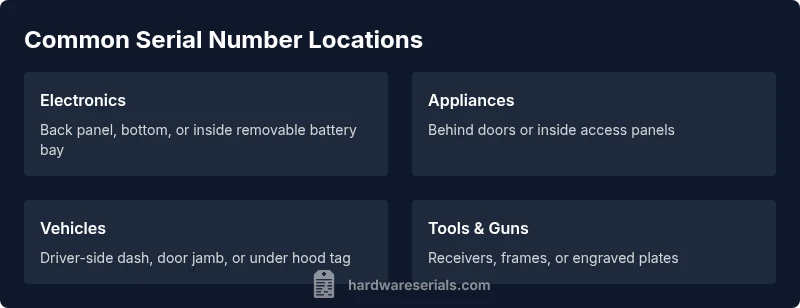
Devices vary, but many serial numbers appear in common places. For electronics, check the backside, bottom, or within removable panels. Appliances often hide the label behind doors or inside access panels, while vehicles usually place VINs on the driver’s side dash or door jamb. For guns and tools, look for metal plates or stamped engravings on the receiver, frame, or head. Always handle the device carefully and respect safety rules when opening any cover. If moisture or dirt obscures the label, clean gently with a soft cloth and verify you are reading the characters correctly. Hardware Serials emphasizes verifying the number against manuals and manufacturer resources to ensure accuracy.
Reading and documenting serial numbers
Once you locate the label, read the serial number carefully. Use a bright light and a magnifier for small fonts, and photograph the label from multiple angles to preserve evidence. Record the exact sequence of letters, digits, and any dashes or spaces, then store the data in a dedicated log (digital or paper) with the device model, purchase date, and location of where the label was found. Keep copies of photos and notes in a secure place. This practice eases warranty claims and future service, and it helps you quickly confirm authenticity if you buy used devices.
Verifying and using the serial number
With the number recorded, cross-check it against the manufacturer’s official database or warranty portal. Look for model cross-reference information, production dates, and any associated serial ranges. If the device is part of a recall, a verified serial number can determine eligibility for service or replacement. Maintain a consistent format across records (e.g., serial number with model and date code) to simplify future lookups. For professionals, sharing verified serial information with clients or colleagues improves transparency and reduces errors.
Special cases: missing labels or digital IDs
Some devices have damaged, worn, or concealed serial labels. In those cases, check packaging, purchase receipts, or the user manual for the serial reference. For vehicles, VINs are often etched or stamped on multiple locations beyond the dash, so inspect under the hood or in the door jamb if allowed by law. If a serial label is truly missing or illegible, contact the manufacturer or an authorized service center for guidance, and document attempts to obtain a replacement record. Always respect legal requirements when handling sensitive items like firearms.
Next steps: organize, protect, and reuse serial numbers
Create a centralized serial number log that includes device type, model, serial, location found, and date of discovery. Back up the log in a secure cloud or physical safe place. Periodically verify serial numbers before warranty expiration or when selling devices. By keeping orderly records, you reduce risk, speed up support, and improve asset management for both DIY projects and professional workflows.
Tools & Materials
- Flashlight or bright lamp(To read faded labels or small fonts)
- Magnifying glass or jeweler's loupe(For tiny etchings or embossed numbers)
- Camera or smartphone with macro mode(Capture clear photos for records)
- Pen and notebook or digital note app(Record serial numbers and locations)
- Soft cloth and isopropyl alcohol (optional)(Clean dirt from labels if allowed)
- Screwdrivers or access tools (as needed)(To remove access panels where permitted)
Steps
Estimated time: 20-40 minutes
- 1
Prepare your workspace
Clear a clean area and gather all tools. Ensure good lighting and a stable surface to avoid dropping small parts. This prepares you for a careful inspection.
Tip: Lay out a soft mat to avoid scratching surfaces. - 2
Inspect exterior label locations
Look for stickers or engravings on the backside, bottom, or sides of the device. Some labels are printed on the packaging or within a nearby lid.
Tip: If the device is hot or powered, wait for it to cool before touching labels. - 3
Check removable access panels
If safe, open panels to access interior labels. Some manufacturers place serial numbers under covers or inside battery compartments.
Tip: Use appropriate tools and avoid forcing panels open. - 4
Look for hidden or recessed labels
Some labels are etched or stamped into metal or plastic and may require light and magnification to read.
Tip: Photograph in good light to capture all characters. - 5
Photograph and record the serial number
Take high-resolution photos from multiple angles. Record the exact characters, including hyphens and spaces.
Tip: Note the exact location where the label was found for future reference. - 6
Verify and store
Cross-check the number with manuals or manufacturer portals and store the data in a dedicated log.
Tip: Back up digital records and retain physical copies if available.
Frequently Asked Questions
What is a serial number and why is it important?
A serial number is a unique identifier assigned to a device by the manufacturer. It helps with warranties, recalls, service history, and authentication. Knowing the serial number makes it easier to obtain support and verify ownership.
A serial number is a unique ID for a device used for warranty and service verification. It helps you get the right parts and confirm authenticity.
Where can you normally find serial numbers on consumer electronics?
On most electronics, look on the back, bottom, or inside removable panels. Some models place the number under the battery compartment or inside the housing. Always check the user manual for the exact location.
Most electronics hide serial numbers on the back, bottom, or inside removable parts. If unsure, consult the manual.
Are serial numbers printed on packaging or documentation only?
Serial numbers may appear on packaging, manuals, or receipts, but the actual device label is the authoritative source. Use the packaging to help locate the label on the device, not as a replacement for the number itself.
Packaging can help you find the label location, but always rely on the device label for the actual serial number.
What should you do if the serial number is unreadable due to wear?
If unreadable, consult the manufacturer’s support resources or an authorized service center. Document attempts to read the number and, if allowed, request a replacement label or verification method.
If the label is unreadable, contact support for guidance and keep notes of your attempts.
Do serial numbers affect warranty claims?
Yes. Warranty claims often depend on validating the serial number against the product records. Ensure your serial is recorded accurately and matches the device model and purchase information.
Serial numbers are commonly needed to validate warranties; keep precise records.
Is it legal to alter or remove serial numbers?
Altering or removing serial numbers can be illegal and may void warranties. Always follow manufacturer guidance and local laws when handling serial IDs.
Do not alter serial numbers; it can be illegal and affect warranties.
Watch Video
Key Takeaways
- Identify the exact label location for every device type.
- Photograph and log serial numbers securely.
- Verify numbers against official databases when possible.
- Document the location and context of each serial read.
- Respect safety and legal guidelines when accessing certain items.