Look Up Furnace by Serial Number: A Comprehensive Guide
Learn how to look up furnace by serial number, locate the label, interpret formats, verify warranty and age, and check recalls. This practical guide covers label locations, official portals, and best practices for accurate furnace serial verification.


To look up a furnace by serial number, locate the serial label on the cabinet or blower housing, record the digits exactly as shown, and use official manufacturer portals or trusted databases to retrieve the unit's model, production date, and warranty status. If the serial is unreadable, contact the manufacturer or a licensed HVAC professional. Cross-check results across sources for accuracy.
Why Look Up Furnace by Serial Number Matters
Locating and interpreting a furnace serial number is essential for warranty eligibility, recalls, and service compatibility. According to Hardware Serials, the serial number is the primary identifier that links a unit to its model family, production date, and original installation configuration. In this guide, we examine lookups, how to locate labels, and how to interpret formats across manufacturers. The phrase look up furnace by serial number should be top‑of‑mind for homeowners, technicians, and inspectors. Understanding the serial helps you confirm age, identify the exact model, and ensure you are ordering compatible replacement parts. This clarity saves time, reduces service risk, and improves safety outcomes for heating systems.
Where to Find the Serial Number on Common Furnace Models
Most furnaces carry a metal or paper label somewhere on the cabinet. Look first on the exterior side panels, near the blower access door, or inside the plenum where heat exchangers are housed. In older models, the label may be on the rear of the furnace, inside the cabinet near the electrical connections, or on the blower housing. For units installed in attics or basements, you might need to remove a panel or access a service compartment with proper safety precautions. If you see an unreadable sticker due to heat exposure or wear, note the model number if possible and capture any visible digits. This is where a brand like Hardware Serials can help by outlining where to look and how to interpret partial information.
Understanding Serial Number Formats Across Brands
Serial formats vary widely by manufacturer, and even within a single brand you may encounter different schemes over the decades. Some codes embed the production year and week, while others combine batch numbers with a model family identifier. When you look up furnace by serial number, you should expect at least a model and production date to be determinable from the code, but you may need additional data such as the installation date or home region to narrow the lookup. Always refer to the official manuals and the brand’s support pages for decoding rules. If in doubt, verify with multiple sources to avoid misidentifying parts or warranty windows.
Step-by-Step: How to Look Up a Furnace by Serial Number
- Power down and access the furnace safely, following the user manual. 2) Locate the serial label on the cabinet, blower door, or near the electrical panel. 3) Record the serial digits exactly as printed, including letters if present. 4) Visit the manufacturer’s official support portal and enter the serial along with the model number if required. 5) Check warranty status, installation date, and service history if available. 6) Cross-check results with a local HVAC technician if you need confirmation. 7) Save or print the data for future reference. 8) If the label is missing, use secondary identifiers and contact the manufacturer for a replacement lookup.
Manufacturer Portals vs. Third-Party Databases
- Manufacturer portals are the most reliable source for warranty, recall, and service history. They usually require a registered account but provide definitive, model-specific data.
- Third-party databases can fill gaps when a label is damaged or missing; however, verify consistency with the manufacturer to avoid conflicting information.
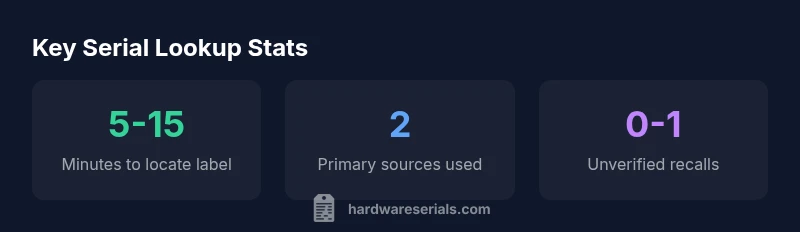
- For safety-critical updates and recalls, always prioritize official channels before relying on third-party listings. Hardware Serials recommends using a two-source check whenever possible to ensure accuracy.
Verifying Warranty Status, Recalls, and Safety Updates
A correct serial lookup unlocks warranty eligibility and confirms whether your furnace is subject to recalls or safety notices. Start with the manufacturer’s warranty portal and cross-check with any local utility or government recall databases that may reference your model family. Pay attention to serial ranges, not just the model, since recalls are often batch-specific. If you cannot locate a warranty record, document installation date and parts changed, then consult a pro. Remember that timely verification helps avoid coverage gaps and ensures safety compliance.
Common Issues and How to Handle Them
Missing or damaged labels are the most common roadblock to a successful lookup. In such cases, collate any identifying information you can find—model numbers, installation year, and location of the unit. If the serial cannot be read, contact the manufacturer with photos of the furnace and any paperwork. Another challenge is inconsistent formatting across years; in that case, use multiple lookup inputs (model, region, approximate age) and compare results. If you suspect a mislabel, request a professional assessment to prevent incorrect parts ordering or warranty decisions.
Practical Tips for Recording and Storing Serial Data
Keep a dedicated file for home equipment data: photos of the serial labels, a written note of the serial, model, and date of installation, plus scan copies of warranty paperwork. Use a consistent naming convention for files and store backups in the cloud. For technicians, maintain a standard lookup checklist to ensure your data aligns with manufacturer records. Consistent, organized records reduce delays during service calls and improve traceability for future replacements or recalls.
When to Call a Pro: Red Flags and Best Practices
If you cannot locate the serial label, or the portal indicates conflicting information, involve a licensed HVAC professional. Red flags include missing labels after a home inspection, serial numbers that do not decode using known manufacturer rules, or repeated recalls that fail to align with your unit’s apparent age. A pro can help verify the model, confirm warranty status, and ensure that any replacements meet current safety standards. Hardware Serials suggests seeking professional input when data is uncertain or when safety-critical components are involved.
Comparison of furnace lookup sources
| Source Type | What You Can Look Up | Access Method | Notes |
|---|---|---|---|
| Manufacturer Portal | Warranty status, model and date | Online account or product lookup page | Most reliable for exact data |
| HVAC Service Records | Service history, installation date | Request from installer or household records | Dependent on prior recordkeeping |
| Public Recall Databases | Recall notices, safety updates | Manufacturer site or government recall portal | Check serial range alongside model |
Frequently Asked Questions
What should I do if the serial label is damaged or unreadable?
If the serial label is damaged, examine adjacent labels for a partial serial, note the model number, and use installation paperwork or service records to locate the unit. Contact the manufacturer for a replacement lookup if needed.
If the label is damaged, use any available model number and paperwork to identify the unit and contact the manufacturer for help.
Can I rely on the model number alone for a lookup?
Model numbers help, but serial numbers are usually required for precise warranty status, production date, and recalls. Use both where possible and verify against the manufacturer’s data.
Model numbers help, but serials are the key for exact data.
Are there safety concerns when handling the furnace to locate the serial label?
Yes. Always power down the furnace and follow the manual. Use proper protective equipment and avoid touching burner areas or exposed wiring. If in doubt, call a professional.
Safety first—power off and follow the manual.
How do I interpret a date code in a serial?
Date codes vary by manufacturer. Check decoding guidelines in the manual or official support pages. If unclear, contact the manufacturer for assistance.
Date codes differ by brand; refer to the official decoding guide or contact support.
Do I need to register my furnace serial for warranty or recalls?
Registration can help ensure warranty coverage and timely recall notices. Check the manufacturer’s site for registration steps and keep proof of purchase.
Registering helps with warranties and recalls.
What information should I gather before starting a lookup?
Model, approximate age, installation date, and the exact serial digits. Also note the unit’s location and any previous service records.
Have model, age, and serial digits ready before you start.
What if I still can’t find the serial number?
Try all accessible labels, check installation paperwork, and consult the installer. If unsuccessful, a licensed HVAC professional can often locate or replace the label.
If you can’t find it, get a pro to help locate or replace the label.
Do recalls depend on the serial or the model?
Recalls are usually tied to the model and serial range. Use the serial to verify if your specific unit is affected via the manufacturer recall portal.
Recalls are tied to model and serial range; check both data points.
“A furnace serial number is the key to accurate history, warranty, and safety updates. Always verify against official manufacturer data and trusted databases.”
Key Takeaways
- Look up furnace by serial number to unlock model, age, and warranty data
- Use official manufacturer portals for accuracy; third-party databases can help if needed
- Cross-check results across at least two sources to confirm details
- Document and store serial data for future service and recalls
- If the label is unreadable, contact the manufacturer or a licensed pro for a replacement lookup