Find & Verify KitchenAid Dishwasher Serial Numbers
Learn where to locate and how to verify the serial number on your KitchenAid dishwasher. This guide covers common label locations, date lookup, and safe verification steps.


Goal: locate and verify your KitchenAid dishwasher serial number. Key locations typically include the door jamb, the tub rim label, and the back panel or interior framing. After locating it, use the code for model matching and manufacture date lookups. You’ll need a flashlight, a smartphone or camera, and the user manual for cross-checks.
Why serial numbers matter for KitchenAid dishwashers
Serial numbers are not just random characters; they unlock warranty, service, and parts compatibility. For KitchenAid dishwashers, the serial number ties together the production date, manufacturing location, and the specific configuration of features installed on your unit. DIYers and professionals rely on it to confirm that replacement parts fit a given model and that the warranty status is accurate. Without a readable serial, you may face delays in parts shipments, incorrect recalls, or denial of warranty coverage. Hardware Serials emphasizes that keeping accurate records of your serial number helps you quickly verify the appliance's identity during service calls and when buying used units. In practice, collect the serial, model number, and purchase date in a simple log that you keep with your appliance documents. The combination of a serial with a model-year and production code also helps you interpret any date-related warnings or recall notices issued by KitchenAid over time. When you know where to look and how to read it, you save time and avoid unnecessary service visits.
Key takeaway: keeping serial numbers organized reduces downtime and protects warranty eligibility. If you’re unsure, start a dedicated log as soon as you locate the first label.
Common locations to find the KitchenAid dishwasher serial number
Location consistency varies by model year and design. Most KitchenAid dishwashers place a label on the door frame near the latch, often visible when the door is open a few inches. Some models tuck the label inside the tub near the upper rack track or behind the kick plate at the bottom front. A few units mount a plate on the rear panel or under the dishwasher's control panel in the console area. When labels are hard to read, use a flashlight and a small mirror to view tight spaces. If your unit has a filter or spray arm housing that opens, inspect their edges for a small tag or etched code. For built-in models, check behind the toe-kick panel by removing two screws carefully. Always wipe any dirt away before reading; dirt can obscure critical characters. If you still can’t locate the label, consult the user manual or KitchenAid support with your model number.
Pro tip: take multiple photos from different angles, and keep a photo log for future reference.
How to read and interpret the serial number
Most serial numbers combine letters and numbers that encode production information. KitchenAid generally uses formats that include a production date or batch code, followed by model-specific configuration digits. Look for a pattern like two letters or digits followed by several numeric digits; sometimes a letter marks a factory or region. The key idea is: the early digits often indicate the year, while later digits reflect the sequence or configuration. Because formats change across product lines, you should not attempt to interpret the code by guesswork alone. Instead, cross-reference the serial with KitchenAid's official lookup tools or the service documentation in the owner’s manual. If you can, photograph the entire label in good lighting. A clear image makes it easier to zoom in on the digits later. By understanding the general layout, you can quickly identify the portion that matters for warranty and parts lookup.
How to verify the serial number against model and date information
Once you locate the serial, verify it against the product model number noted on the rating plate. Use KitchenAid's official support site or the owner’s portal to check warranty eligibility and production date. If you have the serial, you can often retrieve the approximate manufacture year and month, which helps determine if any recalls apply to your unit. Cross-check the date code with the estimated service windows for typical maintenance tasks. If the label is damaged, use the model number and manufacturing date to search the manufacturer’s documentation, or contact support with both numbers. Always save a screenshot of the lookup results. Hardware Serials recommends maintaining a centralized record of your unit’s key identifiers for quick reference during repairs and when reselling.
Step-by-step guide to locating the serial number on different KitchenAid dishwasher models
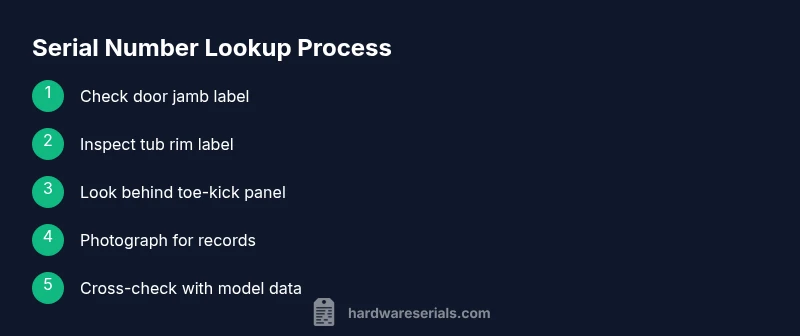
KitchenAid dishwashers come in multiple configurations, including built-in, portable, and compact under-counter models. The serial number will be in one of a few spots depending on the design. This section provides model-agnostic guidance that applies to most recent units and helps you prepare for model-specific variations. Start by inspecting the door jamb label as your first stop; it is often the most accessible. If you don’t see it there, check inside the tub rim where labels sometimes hide under the lip. For some models, the rear panel near the motor or a small access panel behind the toe-kick holds the serial plate. In all cases, use a flashlight, clean hands, and a microfiber cloth to avoid smudges. When you photograph, keep the label flat and in focus, avoiding glare. Finally, cross-check the serial with your model number printed somewhere else on the unit to ensure you have the right pairing. If you still cannot read the label clearly after cleaning and retaking photos, contact KitchenAid support with your model number and any visible characters.
Safety tips and common mistakes
- Always unplug the dishwasher before removing any panels or touching internal components. This reduces the risk of electric shock and water exposure. - Do not pry labels loose with tools; damaging a label makes verification impossible and may void warranties. - Use a bright, steady light and a neutral background when photographing labels to avoid glare and misreads. - Keep your serial number separate from other identifiers in a dedicated notebook or digital note for quick reference during service calls. Pay attention to model-year differences, as a label that exists on one variant may be absent on another. - If you encounter a stubborn label, consult the user manual first, and reach out to KitchenAid support rather than guessing.
Troubleshooting: no serial number found or faded labels
If you cannot locate a readable serial, begin with the model number and purchase date as your anchors. Use KitchenAid’s official lookup tools with those identifiers. Check alternate label locations such as the underside of the door, the back panel, or inside the bottom toe-kick area. If the label is illegible due to wear, you may request assistance from KitchenAid customer service; provide the model number, approximate purchase date, and photos of what you can read. In some cases, the original sales invoice or packaging contains the serial or a reference that can help. As a last resort, a professional technician can often identify the unit type from control panel features and internal configurations, enabling targeted parts lookup and service planning.
Maintenance tips to keep serial information accessible
- Store a copy of the serial and model numbers with your appliance manual in a dedicated folder or digital note. - When moving or cleaning, avoid soaking labels; gentle dry wiping helps preserve readability. - Use a photo log for future reference; date each photo to track changes, recalls, or replacements. - Periodically review your serial number against any recalls or firmware updates announced by KitchenAid. - Consider adding a small label protector in front of the serial plate if the unit is in a high-dust environment. This keeps the code legible for years.
When to contact Hardware Serials for help
If you’re stuck, the Hardware Serials team recommends reaching out for guided help. We can help you interpret serial formats, locate labels on uncommon configurations, and suggest lookup paths for manufacture dates and warranty coverage. Collect model and partial serial information first, then request our targeted advice to minimize guesswork and avoid wrong parts orders. Keeping a clear, well-documented record of your unit’s identifiers makes future service faster and more accurate.
Tools & Materials
- Flashlight (LED)(Bright, adjustable; helps read tiny characters on labels.)
- Smartphone or camera(Capture high-resolution photos of serial labels.)
- Owner’s manual (digital or printed)(Contains model lookup guidance and label locations.)
- Soft microfiber cloth(Wipe dirt to improve label readability.)
- Mirror or small handheld mirror(Useful for viewing hard-to-reach labels.)
- Screwdriver set(Flat-head may help remove toe-kick panels if needed.)
Steps
Estimated time: 20-40 minutes
- 1
Gather essential tools
Assemble a flashlight, smartphone, manual, and cloth. Confirm you have a clean workspace and good lighting before you start. Why: Good preparation prevents delays and reduces the risk of damaging labels.
Tip: Keep everything within arm’s reach to avoid scrambling mid-inspection. - 2
Inspect the door jamb label
Open the door fully and locate the label on the inner edge of the door frame. Read the characters carefully, using the flashlight for illumination. If the print is small, photograph from multiple angles.
Tip: Use a macro setting on the camera to improve legibility. - 3
Check the tub rim and interior panels
Lean gently to access the tub rim area; labels may be tucked under the lip or behind spray components. Look behind accessibility panels and behind gaskets where residue can obscure text. Clean the area before reading.
Tip: Do not force panels; pry only where manufacturer instructions allow. - 4
Inspect the rear panel or toe-kick area
Some models place the serial plate on the back exterior panel or under the front toe-kick. If you need to remove a small panel, ensure the unit is unplugged and screws are replaced after inspection.
Tip: Document any removed screws and their locations to avoid misplacement. - 5
Photograph and document
Take high-resolution photos of every readable label. Save a photo log with model number and date codes where shown. Label photos with model and approximate date of inspection.
Tip: Back up photos to cloud storage for redundancy. - 6
Cross-check serial against model info
Use KitchenAid support pages or your owner’s manual to verify that the serial corresponds to the correct model and date. This confirms eligibility for warranty and compatibility of replacement parts.
Tip: If results differ, re-check diagrams in the manual and consider calling support with both numbers. - 7
Create a record and store safely
Compile the serial, model number, purchase date, and lookup results into a single file. Store it with appliance documentation and in a digital backup.
Tip: Set a reminder to review this record when you perform periodic maintenance.
Frequently Asked Questions
Where is the serial number usually located on a KitchenAid dishwasher?
Common locations include the door jamb label, tub rim, or rear panel. Variations exist by model year, so consult your manual if needed.
Check the door frame, tub edge, or back panel for the serial label; models vary, so refer to your manual.
Why do I need my dishwasher serial number?
The serial number helps determine warranty validity, compatible parts, and date-related recalls for your KitchenAid unit.
It confirms warranty status and helps find the right replacement parts.
What if the label is faded or missing?
Try alternate locations like the rear panel or toe-kick area. If unreadable, contact KitchenAid support with model details.
If the label is hard to read, check other locations or reach out to support with your model info.
How can I decode the manufacture date from the serial?
Date codes are model-specific. Use KitchenAid official lookup tools or manuals to interpret the serial accurately.
Date codes vary by model; use the official lookup tools to confirm.
Do all KitchenAid dishwashers have serial numbers?
Nearly all KitchenAid dishwashers include a serial number label; some older variants may differ. Check common locations first.
Most units have a serial, but check the manual for exceptions.
What should I do after finding the serial number?
Record it, verify against model details, check warranty status, and store for future service needs.
Note it down and keep it with your warranty and model info.
Can I find the serial number on replacement packaging or invoices?
Yes—packaging, receipts, or invoices often reference the serial or model numbers when the label is damaged.
Check the box or receipt for the numbers if the unit is unlabeled.
Watch Video
Key Takeaways
- Identify all potential label locations.
- Use bright light and photos for accuracy.
- Cross-check serial with model and date information.
- Document identifiers for future service.
- When in doubt, consult official support channels.