How to Check if VIN Number is Stolen
Learn how to check if VIN number is stolen using NICB VINCheck, NHTSA VIN decoder, and vehicle history reports. Step-by-step methods protect you from fraud and unsafe vehicles when buying or selling.


Learn how to check if VIN number is stolen using official sources like NICB VINCheck and the NHTSA VIN decoder, plus vehicle history reports. This quick check confirms title status, recall history, and ownership records to help you avoid fraud when buying or selling vehicles. Follow the steps for a solid verification.
Why verifying a VIN number is stolen matters
If you’re buying a used car, knowing how to check if VIN number is stolen is essential to protect yourself from fraud, liability, and unsafe vehicles. According to Hardware Serials, VIN verification is your first line of defense against scams that rely on stolen vehicle identity. The Hardware Serials team found that buyers who skip VIN checks are more likely to encounter title disputes, unexpected repossessions, and hidden recalls. A simple VIN search can reveal whether the number matches the vehicle’s history, title status, and safety recalls. This guide will walk you through practical steps, trusted sources, and real-world scenarios to help you verify the VIN efficiently and with confidence. By the end, you’ll know which checks to run, what results mean, and how to act if a VIN turns up stolen. Remember, consistent checks across multiple sources reduce risk and protect you from costly mistakes.
Understanding VIN numbers and what stolen means
A Vehicle Identification Number (VIN) is a 17-character code that encodes the manufacturer's identity, vehicle attributes, and a unique serial sequence. When someone steals a vehicle, they may alter, clone, or disguise the VIN to hide the theft. A stolen VIN might appear on a salvage title, mismatch with the frame, or show conflicting history entries. Understanding these signals helps you evaluate a listing or purchase more accurately. In this section, we’ll demystify VIN structure, explain common indicators of a stolen VIN, and set expectations for what official checks can and cannot tell you. You’ll learn which parts of the VIN string carry meaning (country of origin, manufacturer, model year) and how anomalies carry risk. Remember: a clean VIN in one record does not guarantee the vehicle is legitimate; you should corroborate with recalls, title history, and police reports when necessary.
Quick checks you can do yourself before buying
- Visually inspect the VIN plate on the dashboard corner of the driver’s side and compare it to the VIN sticker on the driver’s door jamb. Numbers should match exactly; look for tampering, overwritten characters, or misaligned rivets.
- Check the VIN stamped on the engine block, frame, and trunk lid (if accessible) and compare with the dashboard VIN. Mismatches can indicate tampering or replacement parts after theft.
- Verify that the VIN on all documents (title, bill of sale, insurance card) matches the vehicle’s VIN. Inconsistencies across documents often signal a red flag.
- Look for signs of repainting or bodywork around the VIN areas; aftermarket replacements may alter VIN location or stamping.
- Photograph the VIN areas and save the listing’s VIN text for cross-checking with official sources. Note any discrepancies and plan to run official checks.
- Use official sources as a follow-up: NICB VINCheck and the NHTSA VIN decoder can corroborate findings and reveal recalls or theft alerts.
Using NICB VINCheck: step-by-step
NICB VINCheck is a free service that lets you see whether a VIN is associated with a stolen vehicle. Start by visiting the NICB VINCheck page and locating the VIN field. Enter the full 17-character VIN without spaces, then submit. If the search returns “No records found,” that means NICB has no stolen-vehicle match in its database for that VIN; however, it does not guarantee the vehicle is entirely clean, so proceed with other checks. If the tool returns a positive match, you should halt any purchase and contact local law enforcement to verify status and provenance. Regardless of the result, download or save the report for your records and share it with the seller to maintain transparency. Pro tip: use NICB VINCheck in combination with other sources to improve confidence and catch fraudulent VINs early.
Checking safety recalls and vehicle history
After NICB VINCheck, check safety recalls via the NHTSA VIN decoder: enter the VIN on the NHTSA recall lookup page to see if there are active or closed recalls. Additionally, pull a full vehicle history report from Carfax or AutoCheck (these services may require payment) to view past ownership, service events, accident history, title changes, and odometer readings. A clean recall history plus consistent ownership data reduces risk, but gaps or missing entries require deeper scrutiny. Remember that recall status is not a guarantee of safety or legitimacy, but it is a vital part of the overall risk assessment.
Cross-checking with your state DMV and local authorities
Visit or call your state’s Department of Motor Vehicles (DMV) to confirm the title status, salvage type, or stolen vehicle records associated with the VIN. Some states publish stolen-vehicle alerts or salvage designations on the title that are not always reflected in private databases. If you’re buying from a private seller, request the title and compare it with the VIN on the vehicle and the seller’s ID. If discrepancies arise, contact the local police or a licensed dealer for an in-person VIN verification and title review. A formal title search can prevent future ownership disputes.
Interpreting results and next actions
If NICB VINCheck and NHTSA recall checks are clean but history reports show gaps, proceed with caution and request additional documentation or an in-person inspection. If any source flags theft or inconsistent history, stop the transaction and consult authorities or the seller to resolve issues, such as reissued title or corrected documents. Even with clean results, ensure the seller provides a valid title, proper ownership history, and verifiable service records before completing a purchase. If you’re unsure, seek guidance from a trusted dealer or legal expert who specializes in vehicle transactions.
Common scams and red flags when VIN checks go wrong
Watch for sellers who pressure you to bypass checks, offer a deal that seems too good to be true, or request payment before completing legitimate verification. VIN cloning and fake titles are real risks; insist on official reports and an in-person vehicle inspection. Look for inconsistent fonts, typos in documents, or mismatched VINs across different parts of the paperwork. If anything feels off, pause the deal and escalate the matter to the relevant authorities or consumer protection agencies for verification.
Practical steps to stay safe going forward
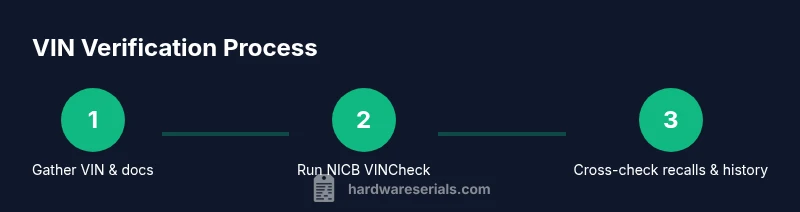
The Hardware Serials team recommends making VIN checks a standard part of every used-vehicle transaction. Always corroborate VIN findings across multiple sources (NICB VINCheck, NHTSA recall data, and vehicle history reports), keep downloadable copies of all reports, and share findings with the seller. Maintain a simple due-diligence trail for future reference, including dates, sources, and outcomes. This disciplined approach reduces risk and helps you avoid costly mistakes.
Tools & Materials
- Internet-enabled device (phone, tablet, or computer)(Stable browser and clear internet connection)
- VIN(Record the exact 17-character VIN from the listing or plate)
- NICB VINCheck access(Use the official NICB VINCheck service (free))
- NHTSA VIN Decoder access(Access the recall lookup and VIN decoder for safety info)
- Vehicle history report (optional but recommended)(Carfax, AutoCheck, or equivalent; may require payment)
- Notebook or notes app(Record results, dates, and action items)
Steps
Estimated time: 45-90 minutes
- 1
Gather VIN and supporting documents
Locate the VIN on the vehicle (dashboard, driver’s door jamb, engine bay, and frame if accessible) and collect the title, registration, and prior history if available. This gives you a baseline for comparison across sources.
Tip: Double-check that all VINs you record match exactly the characters shown on the vehicle. - 2
Open NICB VINCheck
Navigate to NICB’s VINCheck page and locate the VIN field. Enter the full 17-character VIN without spaces and submit. This step screens for stolen-vehicle matches in the NICB database.
Tip: Use NICB VINCheck as an initial screen, not a final verdict. - 3
Interpret NICB results
If NICB returns a match to a stolen vehicle, halt the transaction and report to authorities. If no match is found, continue with other checks for a more complete picture.
Tip: Save or export the NICB report for your records. - 4
Check recalls and safety data
Enter the VIN in the NHTSA VIN decoder to review recall history and safety information. Recall data may reveal pending issues unrelated to theft but important for purchase decisions.
Tip: Some recalls may be resolved; verify current status with the seller. - 5
Pull a vehicle history report
Request a vehicle history report from Carfax, AutoCheck, or an equivalent service to view prior ownership, accidents, service events, title changes, and odometer readings.
Tip: Compare reported mileage with the current odometer for inconsistencies. - 6
Cross-check with the DMV and police records
Contact or visit your state DMV to verify title status, salvage designations, or any theft flags tied to the VIN. If theft is suspected, involve local law enforcement.
Tip: Document the interaction and retain copies of all responses. - 7
Synthesize results and decide
Weigh all sources together. A clean NICB, recalls, and history data reduce risk, but any red flags warrant additional verification or walking away from the deal.
Tip: If unsure, consult a trusted dealer or attorney before purchasing. - 8
Document and preserve your due diligence
Keep a file with VIN, sources, screenshots, and reports. This creates a transparent trail should questions arise later.
Tip: Store digital copies in a cloud folder for easy sharing with the seller.
Frequently Asked Questions
Is NICB VINCheck free and reliable for detecting stolen VINs?
Yes, NICB VINCheck is a free tool designed to flag stolen-vehicle matches. It should be used as part of a broader verification strategy that includes recalls and history reports. No single source guarantees a vehicle’s legitimacy.
NICB VINCheck is free and helpful, but don’t rely on it alone; combine it with recalls and history reports for confidence.
What should I do if NICB VINCheck shows a match for a stolen vehicle?
If NICB indicates a stolen vehicle, pause the purchase and contact local law enforcement to verify status. Request any supporting documents from the seller, and consider walking away if records cannot be clarified.
If NICB flags theft, stop and check with authorities before proceeding.
Can a VIN be stolen but still pass a VIN check or a recall lookup?
Yes, VIN theft can be concealed or duplicated in some cases. A stolen VIN may not always show up immediately in every database, so use multiple checks (VIN history, recalls, DMV records) to form a complete view.
A VIN might not reveal theft in every database, so use several checks together.
Does a clean NICB VINCheck guarantee the car is safe to buy?
A clean NICB result reduces risk but does not guarantee safety or legitimacy. Always verify title, ownership, service history, and title status with official records before purchasing.
No single check guarantees safety; verify with multiple records.
What is the difference between VIN and title verification?
VIN verification confirms the vehicle identity, while title verification confirms ownership and legal status. Both are essential for a legitimate purchase, especially if the VIN shows red flags.
VIN checks identity; title checks ownership. Do both.
How often should I run VIN verification when buying used gear?
Whenever you buy used vehicles, run VIN checks as part of your due diligence. Re-evaluate with updated reports if you’re making an offer after the initial review.
Run VIN checks for every used-vehicle deal and refresh reports if it’s a long time before purchase.
Watch Video
Key Takeaways
- Verify VINs with NICB VINCheck and NHTSA recalls.
- Cross-check against a vehicle history report for ownership and events.
- Do not buy if any source flags theft or inconsistencies.
- Document all findings and maintain a transparent trail.
- Use multiple sources to build a reliable picture of provenance.