Serial Number Finder: The Complete Practical Guide
Learn how to locate, record, and verify serial numbers with a serial number finder. This expert guide covers tools, methods, and best practices for electronics, appliances, vehicles, guns, and tools.


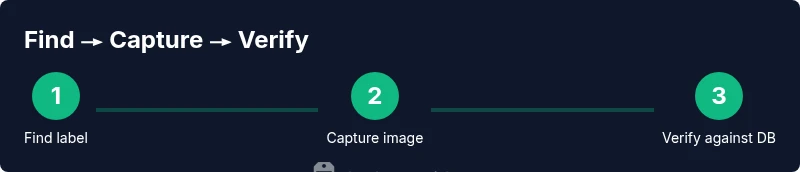
You will locate, record, and verify serial numbers across electronics, vehicles, tools, and more using a serial number finder. This quick guide shows where to look on common devices, how to capture the digits accurately, and how to compare them against trusted sources. Follow the steps to reduce errors and confirm authenticity fast.
What is a serial number finder and why it matters
A serial number finder is a tool or application designed to help you locate, capture, and record the unique identifiers printed on devices, parts, and components. For professionals and DIYers, these numbers unlock warranties, service history, recalls, and provenance. A reliable serial number finder reduces guesswork by converting hard-to-read labels into precise data you can store and search later. According to Hardware Serials, the right finder should support multiple device types, offer both manual entry and OCR capture, and connect to trusted databases for verification. In practice, you’ll use it to confirm that the label you see matches the product’s official identity, preventing misidentification when purchasing, refurbishing, or auditing equipment. This straightforward approach helps you build an auditable trail for asset management and compliance.
Common places to find serial numbers by device category
Serial numbers live in predictable places, but the exact label varies by category. Electronics such as laptops, tablets, and cameras usually show a sticker on the bottom panel or inside the battery compartment. Appliances like refrigerators and washing machines often print a metal plate or sticker near the door frame. Vehicles reveal VINs on the dashboard, driver-side door jamb, or engine bay. Tools carry engravings or stickers on metal handles or body housings. Firearms require compliance with strict labeling and safety protocols. By understanding these patterns, you can target your search efficiently and avoid damaging sensitive labels. This knowledge also informs your choice of a serial number finder with robust image capture and OCR capabilities.
Selecting the right serial number finder for your needs
There are several kinds of serial number finders. A dedicated app on your smartphone can scan barcodes, photos, or embossed marks and then cross-check them against manufacturer databases. Standalone hardware scanners offer higher durability in fieldwork but require data syncing. Some services provide offline lookup for remote sites; others depend on internet access for live verification. Consider your device types, the typical label formats (numeric-only, alphanumeric, or embedded QR codes), and your workflow. A good choice supports image capture, note-taking, exportable records, and clear reporting that you can share with clients or team members. Also evaluate privacy policies and data retention practices before connecting to cloud services.
Step-by-step guidance for locating serial numbers on common devices (overview)
Locating serial numbers begins with a systematic search: start at the most accessible label, then check less visible areas. On electronics, open panels only if safe and permitted; many devices enforce warranty voiding rules if opened improperly. On appliances, look for the data plate near doors, hinges, or the back panel. For vehicles, a VIN may be etched into a dash plate or door jamb; use a flashlight for low-contrast engravings. For firearms and tools, always follow safety and legal guidelines and rely on manufacturer documentation when in doubt. This approach minimizes misreads and helps you capture the exact characters. Consistency in capturing the label is crucial for later validation.
Interpreting serial numbers: decoding formats and dates
Serial numbers encode information about production dates, locations, and model variants, but there is no universal scheme. Some brands embed year‑of‑manufacture in the digits; others use batch codes that require a lookup table. When you extract a serial number, note the font, spacing, and any separators such as dashes or spaces, as these details help confirm authenticity. If you’re comparing to a database, enter the exact string including any prefixes or suffixes. Remember that a serial number alone does not prove authenticity; cross-reference with model numbers, manufacture date, and warranty status for a reliable picture. This meticulous approach reduces false positives during audits.
Verifying serial numbers against official sources
Verification means cross-checking the captured number with official registries, manufacturer portals, or regulatory databases. Start with the company’s support site and search for a serial number or model code. If you’re dealing with vehicles, you may consult national VIN lookup resources or dealer networks. For guns, follow applicable laws and use licensed databases or manufacturer records. Keep a record of the lookup results, including date, source, and the tool you used to capture the value. This practice reduces disputes and protects against counterfeit labels. Using multiple sources strengthens confidence in your findings and supports traceability for compliance.
Privacy, safety, and ethical considerations
Handling serial numbers involves sensitive data about ownership, warranties, and compliance. Do not share numbers in public forums or social media, and avoid storing them in insecure apps. When inspecting someone else’s property, obtain permission and document the purpose. If you find hazardous or restricted items, contact the manufacturer or authorities as appropriate. The aim is to improve asset management while respecting privacy and legal requirements. A disciplined approach protects you and others from misuse and helps maintain a trustworthy audit trail.
Troubleshooting common issues with serial number finders
Label damage, glare, or embossed codes can hinder capture. If OCR fails, try a higher‑contrast lighting setup, reorient the label, or take multiple shots. If a number appears corrupted, verify with a secondary label (for example, a warranty card) or cross-check with the manufacturer. Connectivity issues (when using cloud services) may require a local offline mode or a data refresh. Always back up your captures to avoid data loss. In challenging cases, switch devices or apps to compare results and ensure you’re not relying on a single imperfect image.
Best practices and workflow for professionals
Create a standard operating procedure for locating, recording, and verifying serial numbers. Use a consistent data schema: device type, serial, model, location, date, and source. Train team members on safe handling and privacy standards, and review workflows periodically to ensure accuracy. When possible, automate repetitive lookups and maintain an audit trail for compliance. A repeatable process saves time, reduces errors, and improves accountability. Finally, archive verified records in a centralized system with version history so older data remains accessible for future audits.
Tools & Materials
- Serial number finder app or device(A dedicated app or barcode/QR scanning tool on a smartphone)
- Camera or scanner(For capturing high-resolution images of labels)
- Notepad or digital notes app(For recording serial numbers and context)
- Good lighting(Natural light or a bright lamp to reduce glare)
- Magnifying glass (optional)(Helpful for tiny print or embossed codes)
Steps
Estimated time: 30-60 minutes
- 1
Prepare devices and gather materials
Collect all items you will inspect and set up in a well-lit workspace. Have the serial number finder ready and ensure your camera or app is functioning.
Tip: Test your app on a sample label before starting - 2
Identify likely label locations
Survey the device and note common label placements for its category. This saves time and reduces the risk of missing the correct serial string.
Tip: Keep a photo log of each location you check - 3
Capture the serial number with the finder
Use the finder to extract the serial string. Take multiple shots from different angles to minimize glare and blur.
Tip: If OCR misses characters, switch to manual entry and cross-check later - 4
Record and annotate the capture
Save the exact serial string, plus context like device type, model, location of the label, and date. Note any readability issues for later review.
Tip: Include a photo and a timestamp for audit purposes - 5
Verify against official sources
Cross-check the captured number with manufacturer portals, support pages, or regulatory databases. Look for matching model numbers and production dates.
Tip: Document the sources and outcomes of each lookup - 6
Archive and share results
Store verified records in a centralized system with searchability. Share with teammates as needed and set access controls.
Tip: Use a standard naming convention for easy retrieval - 7
Review for inaccuracies
Periodically audit a sample of records to ensure ongoing accuracy and compliance.
Tip: Schedule routine checks to catch drift early
Frequently Asked Questions
What is a serial number finder?
A serial number finder is a tool or app that helps locate and capture serial numbers from devices. It supports documentation for warranties, servicing, and verification.
A serial number finder helps you locate and capture serial numbers for warranties and verification.
Why should I use a serial number finder?
Using a serial number finder streamlines asset management, improves accuracy, and speeds up verification with official sources.
It streamlines asset management and speeds up verification with official sources.
Can serial numbers be forged?
Yes, labels can be forged or replaced. Always cross-check with multiple sources and verify model numbers and dates.
Yes, but you can reduce risk by cross-checking with multiple sources.
Do I need internet to verify numbers?
Some verifications require internet access to reach manufacturer databases, while others offer offline lookup options.
Some lookups need internet; others work offline.
Where can I find serial numbers on common devices like laptops or appliances?
Laptops often have stickers on the bottom or inside the battery compartment; appliances may show a data plate near doors or backs. Vehicles have VIN locations like the dashboard or door jamb.
On laptops, look bottom or inside the battery area; on appliances, look near doors or back; for vehicles, check the dashboard or door jamb.
What if the label is unreadable?
If unreadable, use secondary identifiers (model numbers, receipts) and contact the manufacturer for guidance. Do not rely on a single unreadable label.
If unreadable, use other identifiers and contact the manufacturer.
Watch Video
Key Takeaways
- Know where serial numbers live on common devices
- Use a dedicated finder to capture and verify
- Always cross-check with official records
- Document each step for audits