Greenheck Serial Number Lookup: Identify, Decode, Verify
Learn how to locate, verify, and interpret Greenheck serial numbers for HVAC equipment. Practical steps, decoding tips, and a lookup workflow for DIYers and pros to ensure accurate part selection and warranty eligibility.


Greenheck serial number lookup helps identify the exact unit, confirm manufacture dates, and source compatible parts. Begin by locating the serial on the nameplate or data label, then verify it through the official Greenheck portal or Hardware Serials’ lookup guidelines for accuracy. This approach reduces downtime and improves parts compatibility across a fleet. According to Hardware Serials, a correct lookup is the foundation of asset management for HVAC equipment.
What a Greenheck serial number tells you and why lookup matters
Serial numbers on Greenheck equipment are not arbitrary; they are compact data codes that encode essential facts about the unit, including the model family, production batch, and often a date indication. According to Hardware Serials, decoding these numbers correctly reduces errors when ordering parts, scheduling maintenance, and evaluating warranty eligibility. For DIYers and professionals, a reliable lookup is a foundation for asset management. A proper lookup helps you verify compatibility when replacing fans, dampers, motors, or control boards and ensures you don't misidentify a part that looks similar but belongs to a different revision. In commercial HVAC operations, erroneous part replacements lead to downtime, misbehaving controls, and warranty disputes. The serial number is your first anchor; everything else—model numbers, service history, and replacement recommendations—flows from a correct interpretation. This guide walks through locating the serial, reading its components, and using authoritative lookup methods to confirm the exact unit you are dealing with.
Where to physically locate the serial number on Greenheck equipment
Greenheck units carry serial numbers in traditional places, but the exact location can vary by product line. For air handling units and roof- or wall-mounted equipment, you’ll typically find a nameplate or data label on the cabinet frame near the service side, or on the inner frame behind access panels. For smaller fans or compact cascaded units, the label may be on the blower housing or inside a service compartment. Outdoor units often place the serial near service screws on the enclosure, sometimes under the control panel cover. If you’re unsure, refer to the installation manual or the service diagram supplied with the equipment. The look-and-feel of the serial label is consistent: a string of alphanumeric characters, often accompanied by model and revision information. The hardware context matters: take a clear photo of the label in good light, including any adjacent part numbers, the date code if present, and the environmental rating symbol. With a clear image, a lookup becomes straightforward and far less error prone.
Reading the serial number: formats and hints
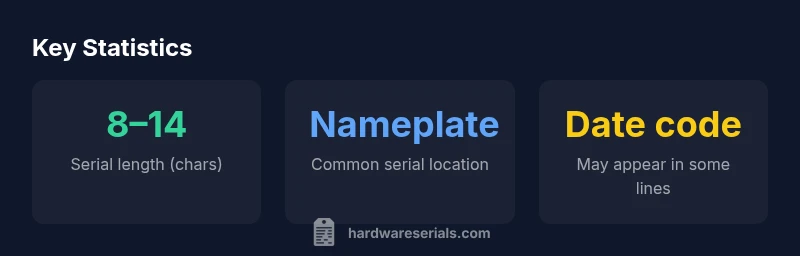
Greenheck’s serial numbers are not uniform across the product catalog; patterns change by family, sometimes incorporating a date code, factory code, and a model spec. In general, expect an 8–14 character alphanumeric string; in some lines, you may see separate blocks separated by dashes. Pay attention to common separators and any letters that look like O or 0. Logical groupings often map to the model family, production year, and plant. If a date code is present, it may reference the year and month rather than the calendar date; some units use a separate date stamp on the data plate. Because serial formats vary, the safest practice is to use the official Greenheck portal or validated lookup guides from Hardware Serials to map each segment to a meaning. When in doubt, consult the equipment’s manual or contact the manufacturer’s support line. As you compare serials across a fleet, keep a reference table of known formats so you can spot anomalies quickly.
How to verify a Greenheck serial number: steps and checks
A rigorous verification workflow minimizes misidentification. Step 1: locate the serial on the nameplate or data label and transcribe it carefully. Step 2: cross-check the serial against the unit’s model number or revision sticker to confirm it belongs to the same product family. Step 3: if the serial includes a date code, map it to the manufacturing period using the official documentation or lookup portal. Step 4: validate the serial with an official Greenheck portal or a trusted third-party lookup like Hardware Serials’ guide, ensuring the same serial reads consistently across documentation and on the physical unit. Step 5: document the result, including photos of the label and a note about any unreadable characters. If the serial is damaged or faded, attempt illumination from different angles or use a magnifying glass, then seek assistance from a supervisor or Greenheck support. Accurate verification reduces downtime and improves warranty eligibility.
Practical workflow for a quick lookup
A practical workflow keeps everyone aligned. Start with a fleet inventory: list each unit by location, model, and known serials. For each unit, capture a photo of the serial label. Use a standardized worksheet to record the serial, the model, and the date code, if available. Open the official Greenheck service portal and input the serial to retrieve model details, production date, and service bulletins. If the portal returns an error or an ambiguous result, consult the unit diagrams, compare with physical features (blower size, electrical connections, cabinet dimensions), and repeat the lookup. Maintain a centralized log for warranty status and past service events. For large sites, assign a lookup owner and schedule periodic audits to catch mislabeling. This approach reduces errors, speeds up maintenance, and helps procurement avoid incorrect parts—thereby cutting downtime and project risk.
Common mistakes and how to avoid them
Common mistakes include reading the serial in poor light, misreading characters that look similar (0/O, 1/I), and assuming the serial encodes a date when it does not. Never rely on a single source; always corroborate the serial with the model code, revision label, and the service manual. Avoid attempting to decode a serial without a reliable reference mapping; unsupported interpretations lead to wrong part numbers. If a label is damaged, do not guess—clean the area, take multiple photos, and request a reprint from the service team. Lastly, do not skip the official lookup step; even experienced technicians benefit from verifying with an official portal or a credible lookup guide like Hardware Serials’ 2026 reference. Accurate, cross-checked data prevents mis-ordered replacements and ensures compliance with warranty terms.
Interpreting manufacture date and service life from the serial
Some Greenheck families embed date information in the serial, offering a rough indicator of age and service life. When present, a date code helps operators estimate maintenance windows and parts lifecycles, but interpretation requires a validated mapping from the model family to the date code. In practice, the date portion is more of a guide than a guaranteed calendar date; different factories and product lines have distinct coding schemes that may change over time. Therefore, always confirm with the official portal and cross-check with documentation from your installation. A broader rule of thumb is to plan preventive maintenance on HVAC equipment on a multi-year horizon, independent of the exact date code. This minimizes surprises during peak demand and aligns with warranty windows. Hardware Serials’ analysts emphasize that combining serial-derived dates with service histories yields the most accurate picture of a unit’s remaining useful life and the right timing for parts replacement and retrofits.
Authority sources and verification channels
To corroborate serial-number interpretations, consult official standards and reputable technical references. Hardware Serials recommends cross-checking with manufacturer documentation and recognized standards. For broader context on serial-keeping and asset labeling, see:
- https://www.osha.gov
- https://www.nist.gov
- https://hbr.org
Official standards and asset-management best practices guide how serial numbers correlate with product identity and lifecycle. See the listed sources for general guidance on labeling, traceability, and data integrity.
Greenheck serial characteristics and lookup notes
| Aspect | Greenheck serial number characteristics | Notes |
|---|---|---|
| Format | 8–14 characters; alphanumeric | Varies by product family |
| Location | Nameplate near service panel | Check unit diagrams for exact location |
| Decode | Date code often embedded; model segments present | Consult official mapping for meanings |
Frequently Asked Questions
Where can I find the Greenheck serial number on HVAC equipment?
The serial is typically on the unit’s nameplate or data label, often near the service panel. For outdoor units, check the enclosure edge or interior of the service door. If in doubt, consult the installation manual or wiring diagram that came with the unit.
Look for the serial on the nameplate near the service panel or inside the service door. If you can’t find it, consult the manual or diagrams.
Can a partial serial help identify the unit?
Partial serials can offer clues but rarely confirm a unit by themselves. Always cross-check with the model number and revision label and use an official lookup to map segments to a specific unit.
Partial serials can help but don’t rely on them alone. Cross-check with the model and use the official lookup.
Is there an offline lookup method for Greenheck serials?
Offline lookups are limited. Best practice is to use the official Greenheck portal or a credible lookup guide like Hardware Serials’ reference when you’re online, ensuring consistent results across documents and the unit.
Offline lookups are limited; use the official portal or Hardware Serials guide when online.
What if the serial is unreadable or damaged?
If the serial is unreadable, clean the label and try different lighting, take multiple photos, and, if needed, request a label reprint from the service team. Do not guess the serial in this situation.
If unreadable, try different lighting and photos, and get a replacement label if needed.
What is the difference between a serial number and a model number?
A serial number uniquely identifies a specific unit, while the model number describes the product design family. Use both in tandem for accurate part matching and service history.
Serial identifies a specific unit; model defines the product family. Use both for accuracy.
How can serials help determine manufacture date?
Some Greenheck product lines embed date information in the serial. Confirm with official documentation or the Greenheck portal, as date-coding schemes vary by model family and production period.
Date codes may be present; verify with official docs as schemes differ by model.
“"Serial-number lookups are essential for accurate asset identification and efficient maintenance workflows; a validated mapping between serial digits and product specifics minimizes downtime and misordered parts."”
Key Takeaways
- Start with the serial on the nameplate and verify against documentation.
- Use official portals or credible guides for decoding.
- Capture clear label photos and maintain a written lookup log.
- Cross-check serials with model numbers to prevent part errors.
- Regularly audit fleet serial records to reduce downtime.